
Book freight online: how the self-service portal works.
Get instant freight quotes from multiple carriers, compare rates side by side, and book LTL, FTL, box truck, or cargo van shipments in under 2 minutes. No broker calls, no signup required to see rates, no hidden fees.
 By Troy Lester, Co-Founder & CRO
98.2% on-time delivery · $100K carrier liability · Up to $1M coverage · No signup required · Trusted by 2,000+ shippers
Live all-inclusive rates
Warp customers






Every screen in the portal, and what happens behind the scenes.
Real screenshots of customer.wearewarp.com paired with what our systems do when you click — no black box.
Enter shipment details on the public quote page
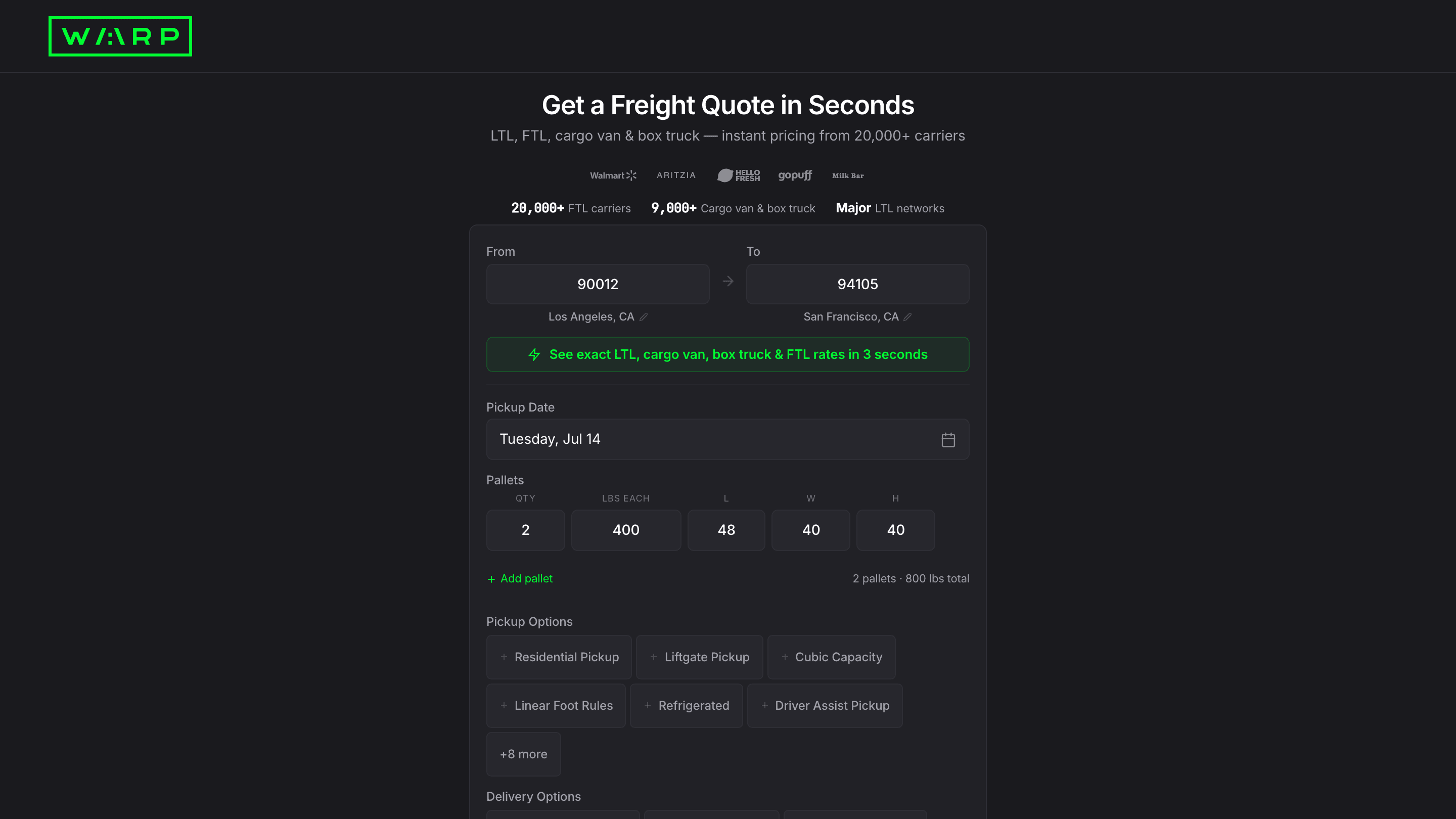
Go to customer.wearewarp.com/public/freight-quote. Enter your origin and destination ZIP codes, pick a date, set pallet count with weight and dimensions, and toggle any services you need (liftgate, residential, refrigerated, driver assist, and more). Click Get Rates. No account required.
The quote page is public: no login, no signup required. The pallet configurator calculates total weight live. Services Needed toggles map to accessorial codes the rating engine uses to include or exclude surcharges. No freight class or NMFC code is required. Warp prices flat per pallet.
Compare live rates and select the best option
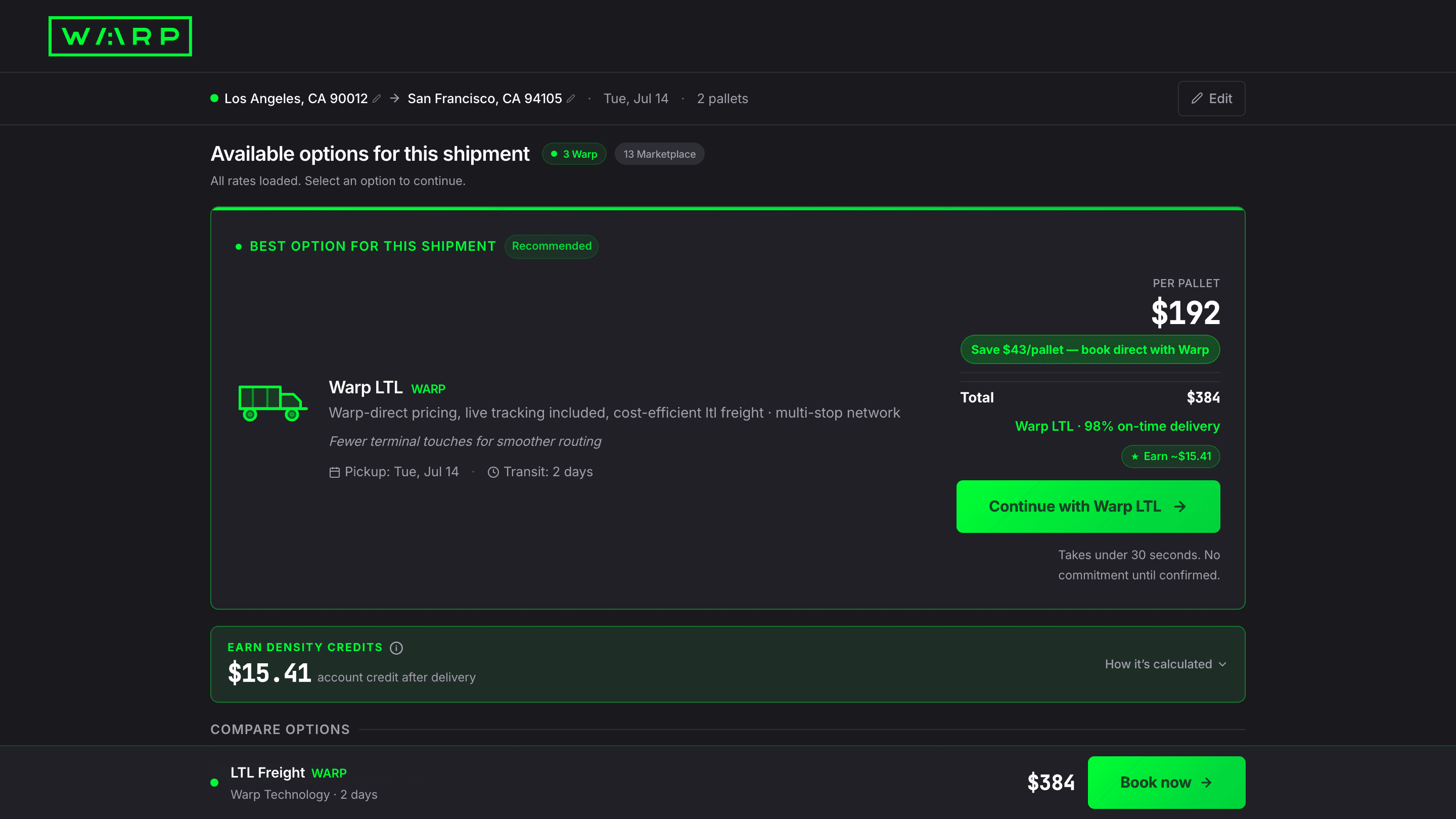
Rates load in under 10 seconds. The top card is flagged Best Option with per-pallet price, total cost, savings vs retail, on-time percentage, and transit time. Click Continue to proceed to checkout, or scroll to see additional carrier options.
The rating engine queries every available carrier and mode on the lane in under 10 seconds. The Best Option tag goes to the lowest all-inclusive per-pallet cost. Rates are locked once you click Continue: no reclassification, no post-delivery adjustments.
Fill pickup details and toggle Falvey cargo insurance
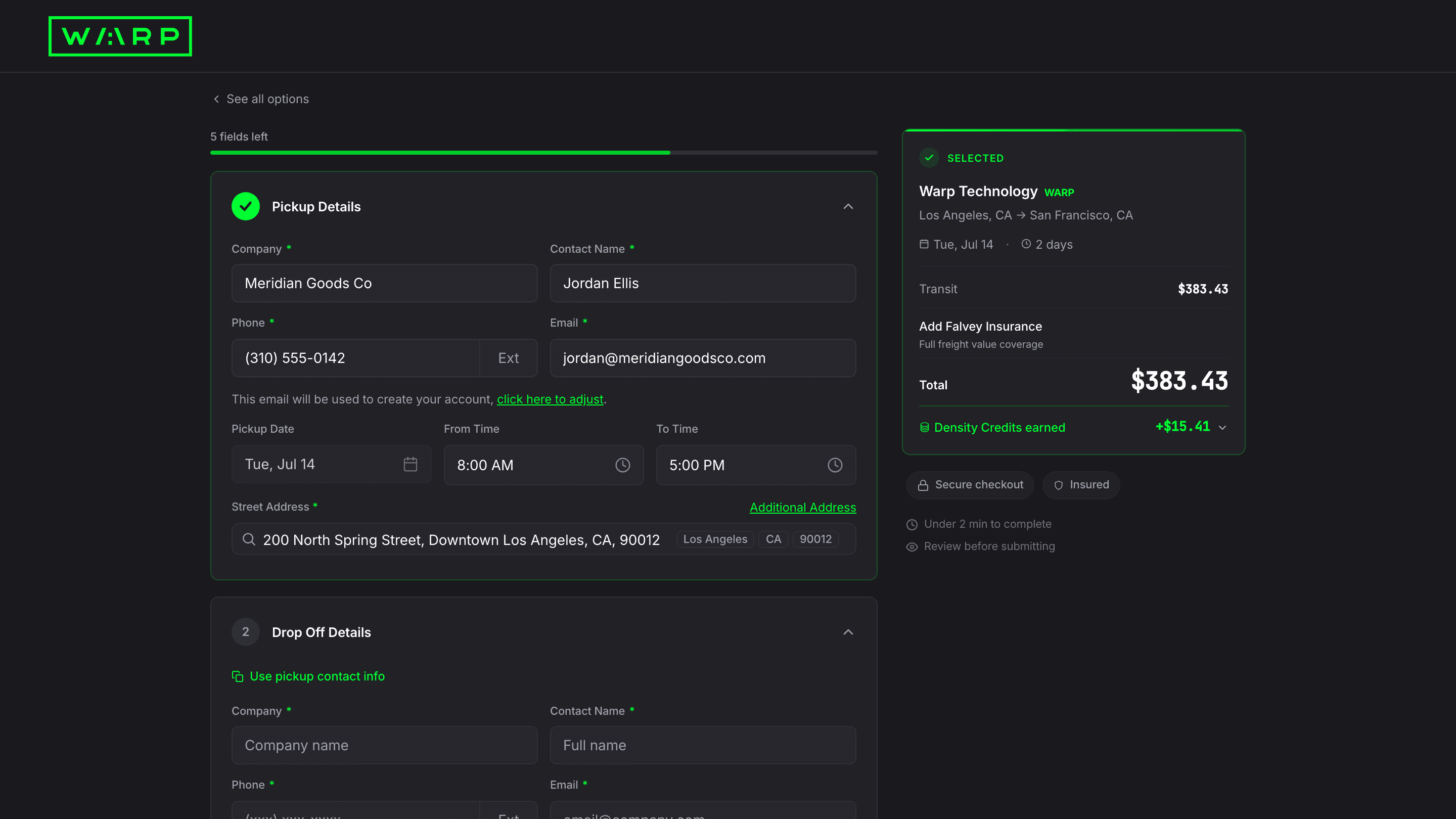
Enter your pickup company, contact, address, and time window. The email you enter becomes your Warp account login. In the sidebar, toggle Add Falvey Insurance to get all-risk cargo coverage. The premium calculates instantly. The sidebar shows your running total with transit cost, insurance, and subtotal.
The email you enter at checkout becomes your Warp account login. The system creates your account as part of the booking flow so you never need a separate signup. Falvey Insurance is powered by Falvey Insurance Underwriters. The insurance certificate generates immediately after booking.
Review Falvey cargo insurance coverage
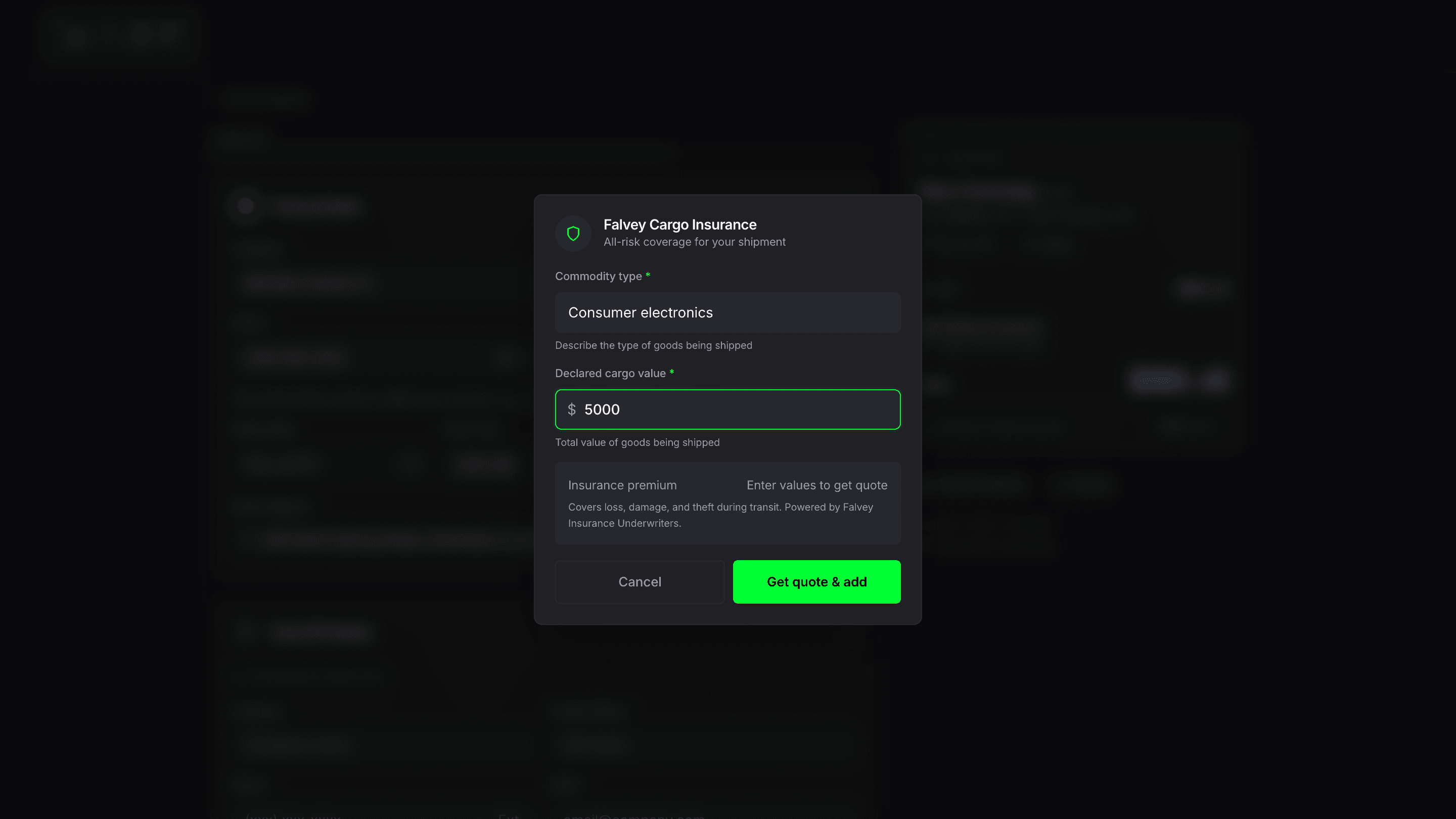
Enter your commodity type and declared cargo value. The premium calculates instantly. Coverage is all-risk: loss, damage, and theft during transit. Every shipment already includes $100K Carmack Amendment liability at no extra cost. Falvey is optional additional protection up to $1M.
Falvey calculates the premium from your commodity type (risk class) and declared value. The premium is typically $30 base plus a $5 processing fee. The insurance certificate generates immediately after booking and is downloadable from your shipment detail page.
Fill drop-off details
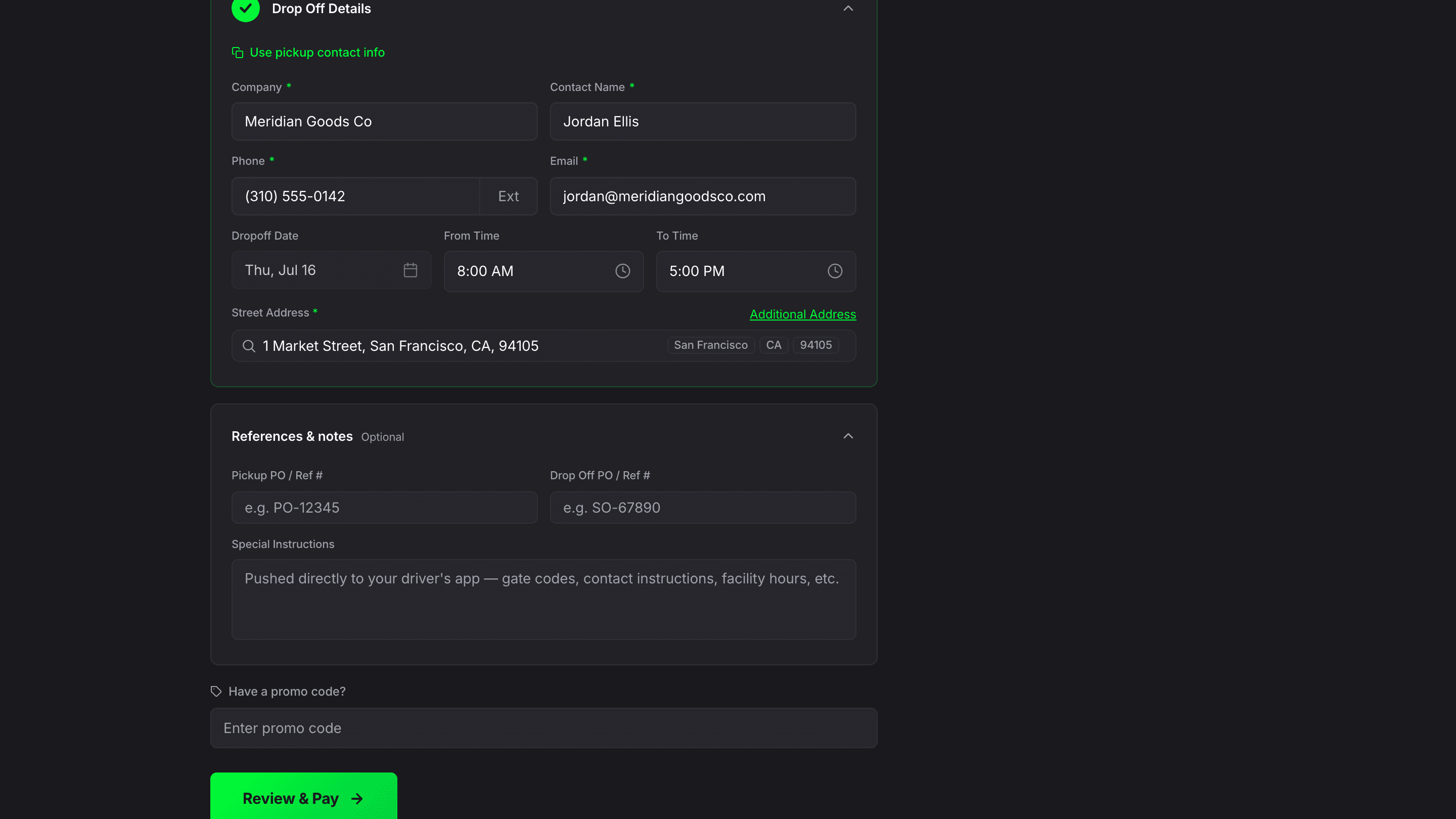
Enter delivery company, contact, address, and time window. Use the shortcut to copy your pickup contact info. The delivery date defaults to the transit-time-based estimate from the rate you selected.
Drop-off details sync into the Bill of Lading as the consignee record. Special instructions entered in the next section push directly to the driver's app so they see gate codes, facility hours, and contact instructions before arrival.
Add references, special instructions, and promo code
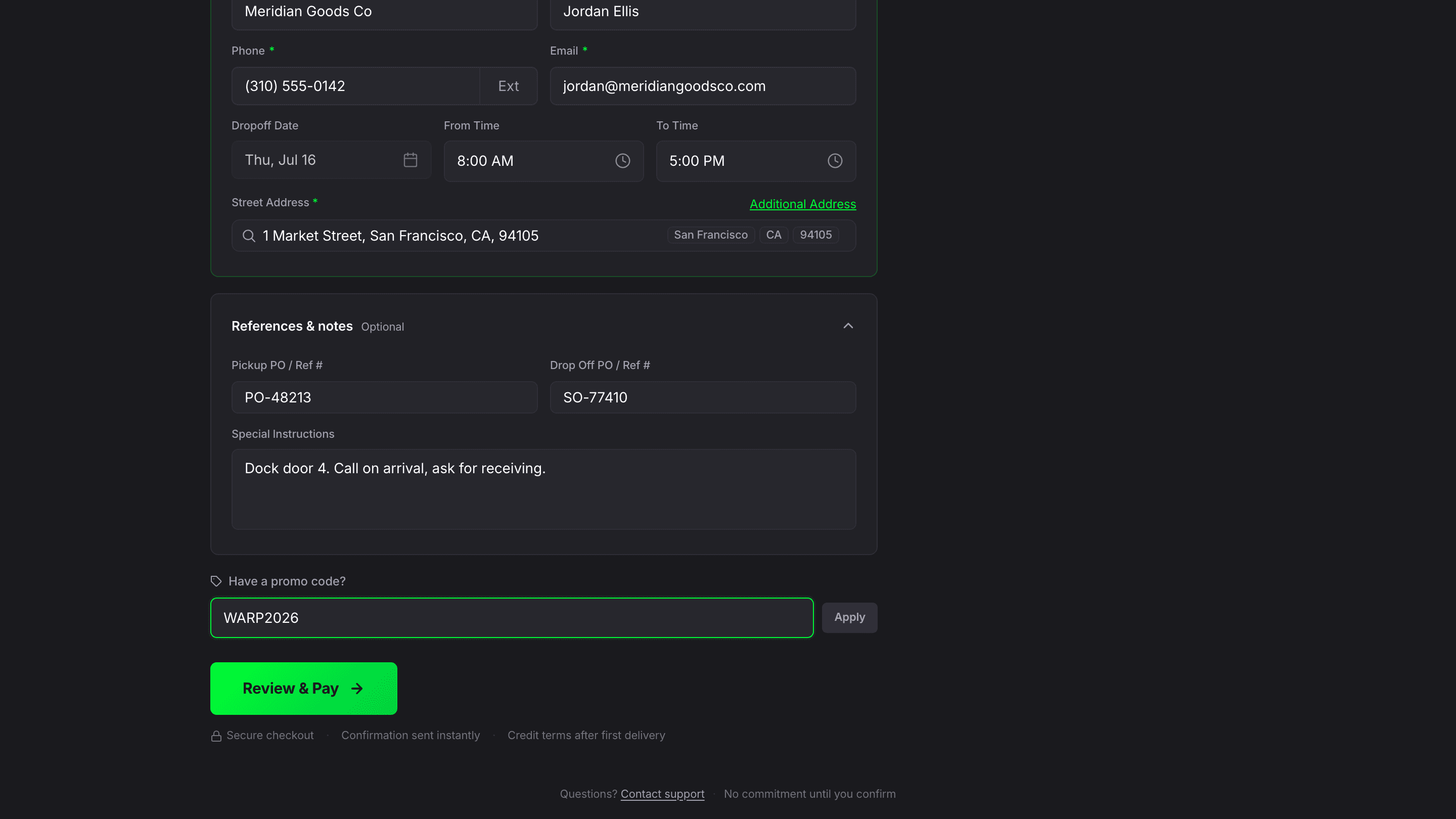
Optionally add pickup and drop-off PO/reference numbers for invoice matching. Enter special instructions (gate codes, facility hours) that push directly to the driver's app. Enter promo code WARP2026 for $50 off your first shipment. Click Review & Pay.
PO and reference numbers sync into the BOL header and shipment record for downstream invoice matching. Special instructions push to the Warp driver app. Credit terms (NET 30) are available after your first completed delivery.
Pay with Stripe and book the shipment
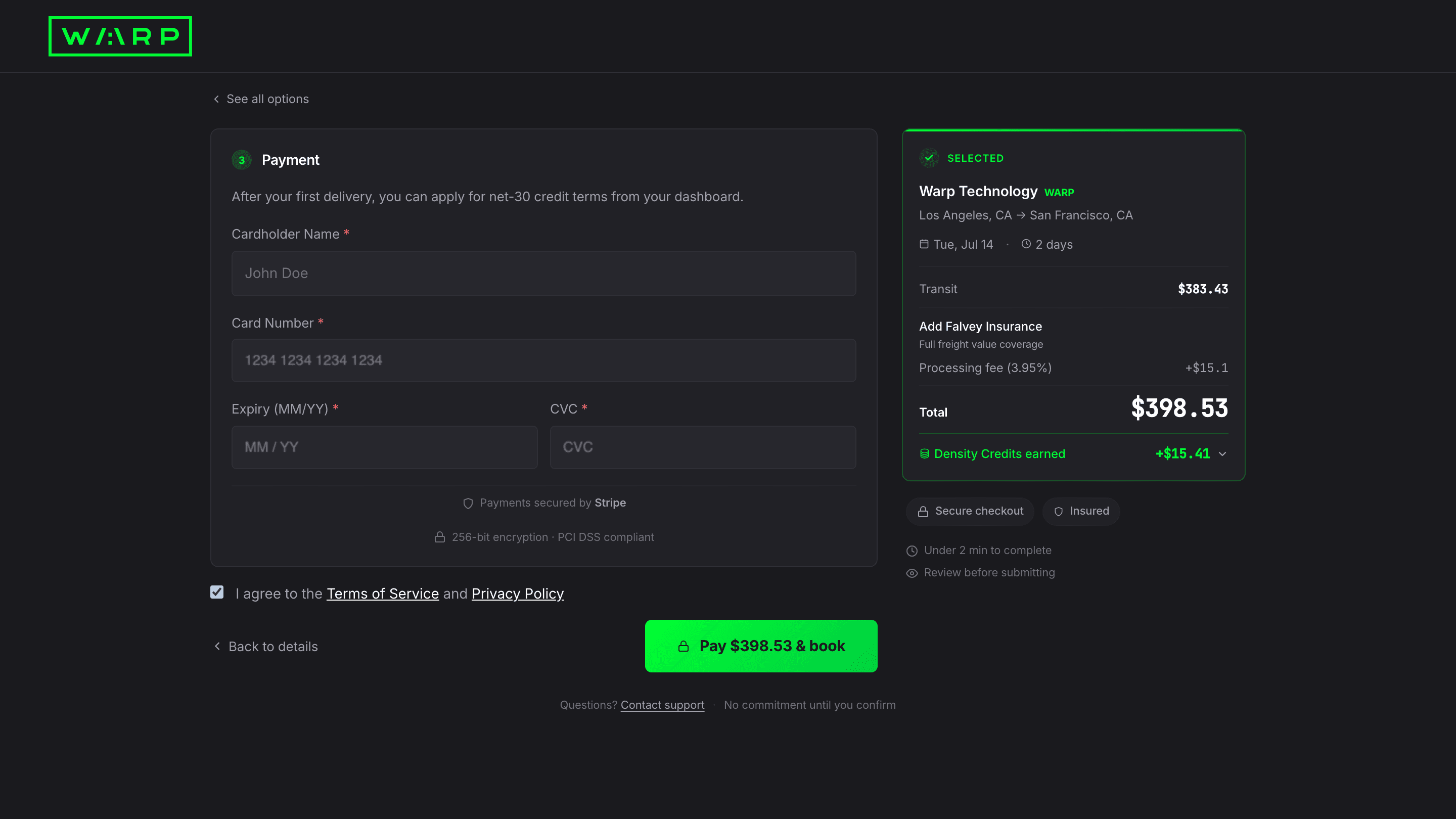
Enter your card details. The sidebar shows the full cost breakdown: transit, insurance (if added), processing fee, and total. Payments are secured by Stripe with 256-bit encryption. Save your card for future bookings. After your first delivery, you can apply for NET 30 credit terms from your dashboard.
Payment is processed through Stripe with PCI DSS compliance. Card details are never stored on Warp servers. After your first completed delivery, NET 30 credit terms eliminate the processing fee on future shipments.
Booking confirmed with instant tracking, BOL, and dashboard access
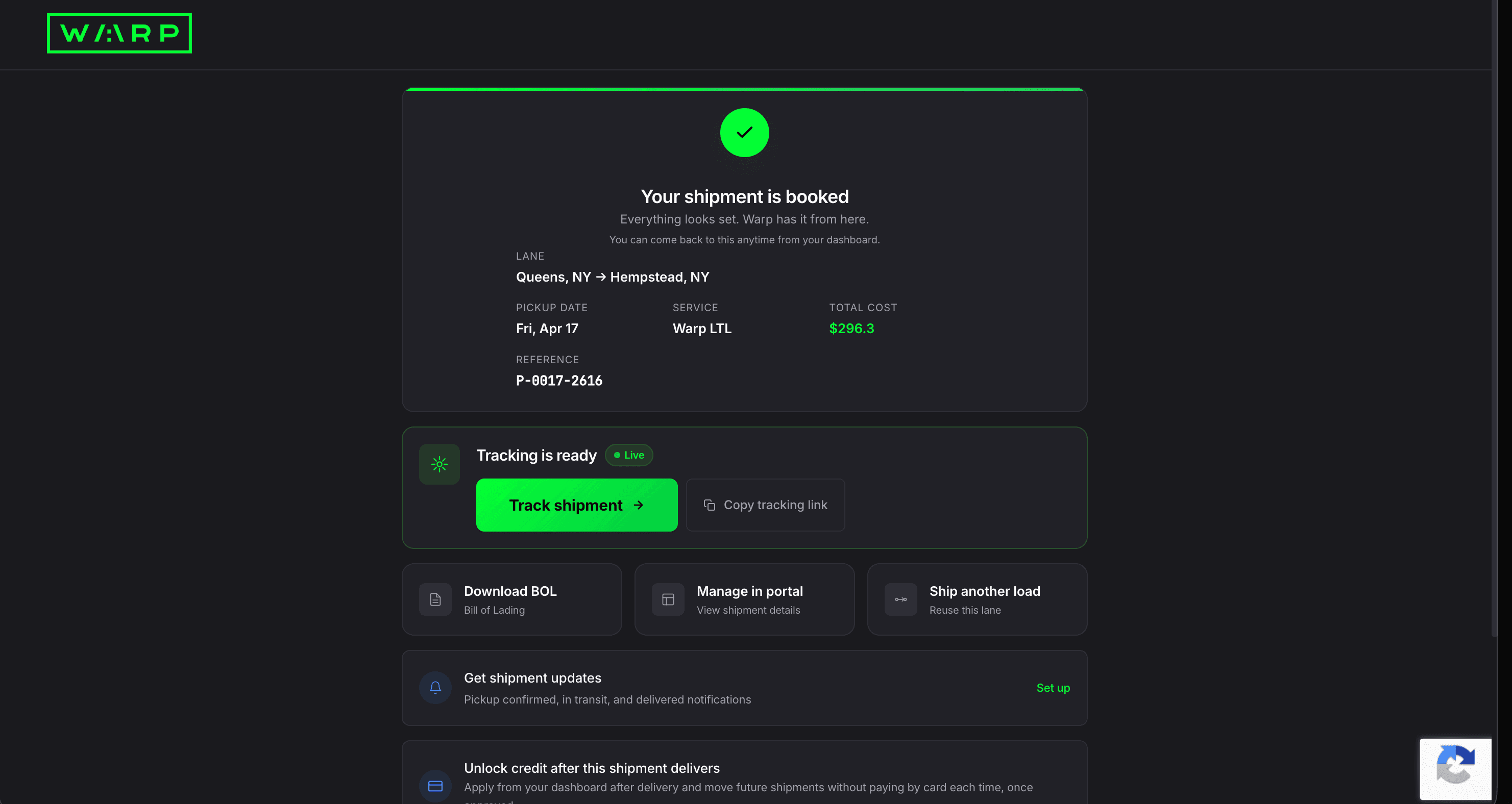
Your shipment is booked. The confirmation shows your lane, pickup date, service, total cost, and reference number. From here you can track the shipment (tracking is live immediately), download the BOL, manage the shipment in the portal, or ship another load on the same lane. Set up notifications for pickup, transit, and delivery updates.
On confirmation, the system creates the shipment record, assigns the carrier, generates the BOL PDF, and activates live tracking, all within seconds. Your Warp account is created from the email you entered at checkout, and a password-setup email is sent so you can access the dashboard going forward.
Public tracking page goes live for your consignee

Copy the tracking link and send it to your consignee. They see a live map with pickup and delivery markers, estimated delivery window, shipment status, and a list of stops with pallet counts. No login required. They can click Receive Updates to subscribe to text or email notifications.
Public tracking strips out account-specific data (cost, references, internal notes). The Receive Updates button creates a notification subscription tied to that single shipment, so your consignee gets text or email updates without needing a Warp account.
Dashboard Home with live stats, density credits, and your shipment map
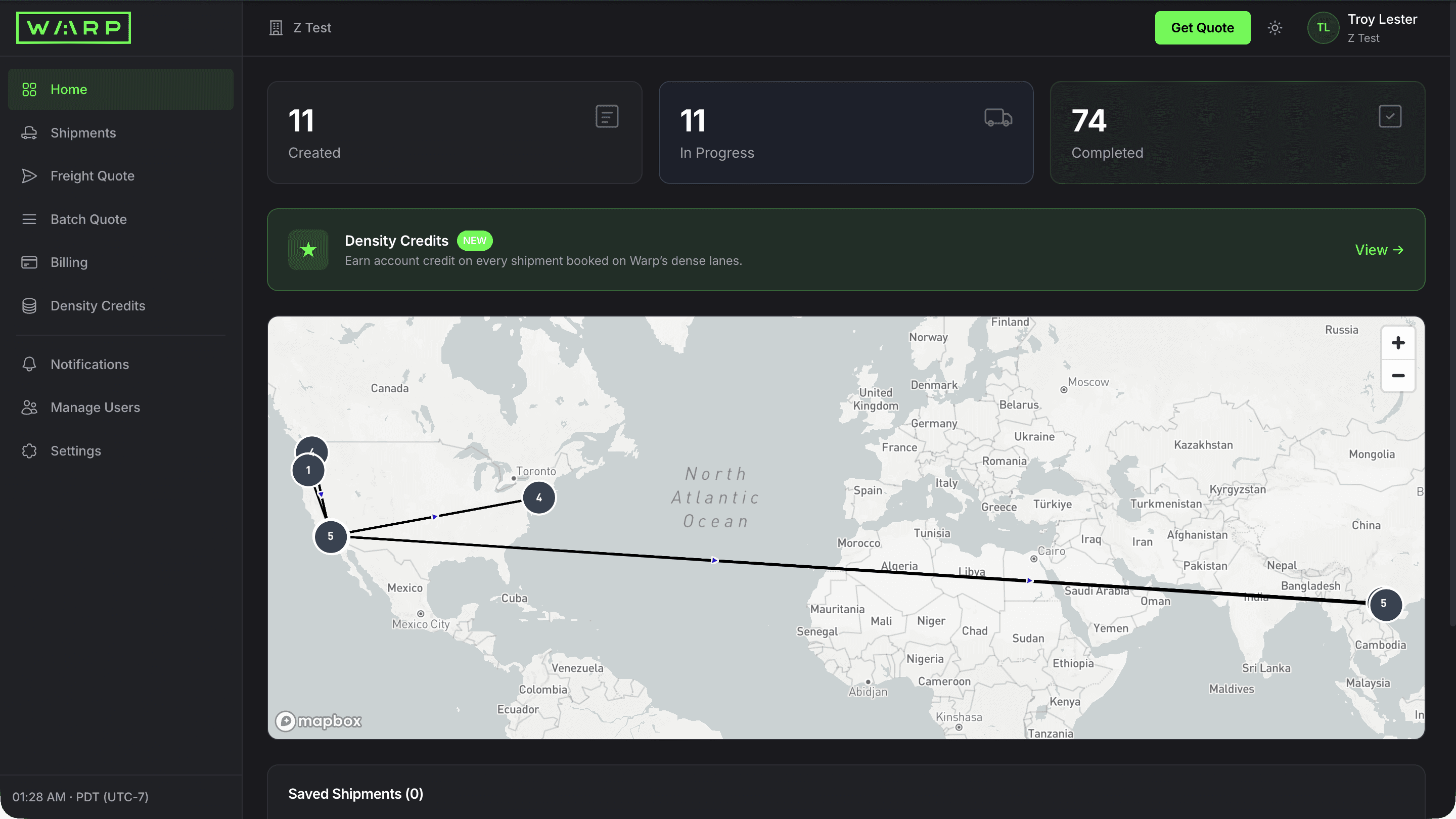
Sign in to land on your dashboard home. Stat cards count your created, in progress, and completed shipments. The Density Credits banner tracks account credit you earn on shipments booked on Warp's dense lanes, and the map plots your shipment locations. Saved shipments sit right below the map.
Stat cards read live from the booking database. Density Credits accrue as account credit after each delivered shipment on eligible dense lanes. The map updates as your shipments move through the network, and bookmarked shipments pin to it for quick access.
Filter and search every shipment
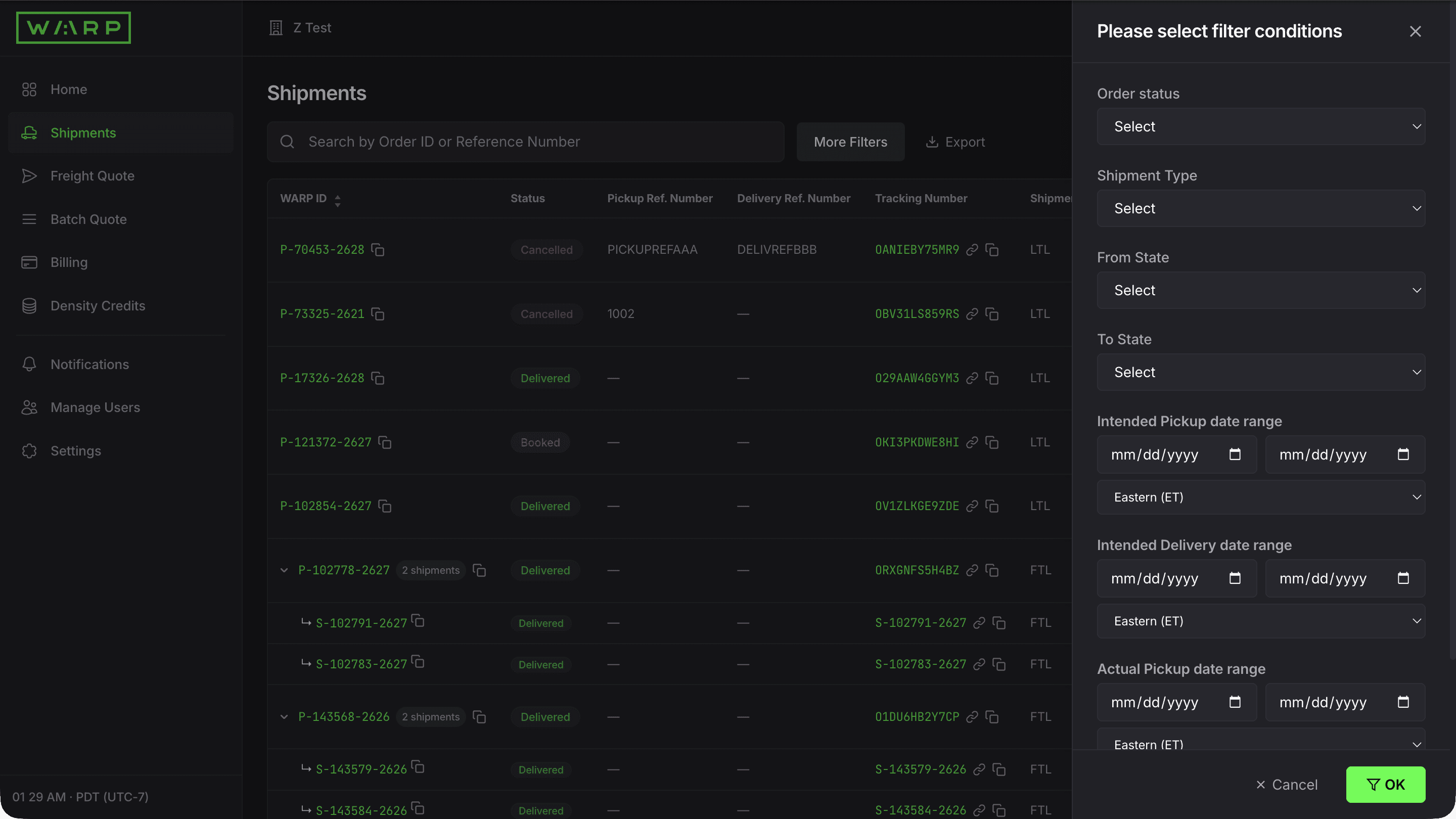
Click Shipments in the sidebar. See every shipment with WARP ID, type, equipment, dates, addresses, cost, and status. Use the search bar to find by Order ID or Reference Number. Click More Filters to slice by status, shipment type, origin/destination state, or date range. Export the filtered list to CSV.
Server-side filtering and cursor-based pagination handle 1,000+ shipments instantly. Export pulls live from the booking database. The bell icon on each row opens per-shipment notification overrides, and Watchlist keeps your key shipments one click away.
Open shipment detail with live GPS map and 4-stage progress
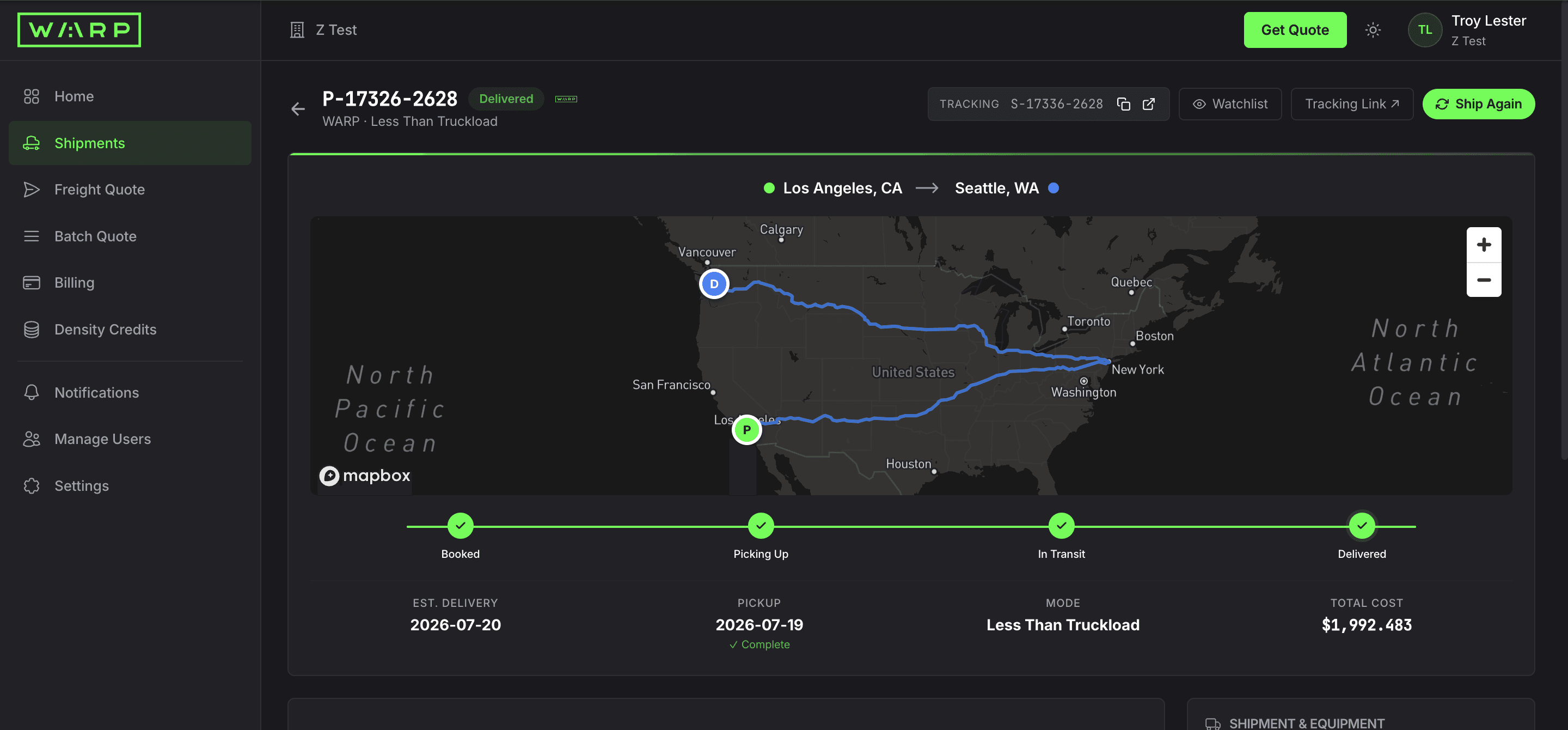
Click any WARP ID. The detail page shows the shipment status, route on a live Mapbox map, and a 4-stage progress bar: Booked, Picking Up, In Transit, Delivered. Below the map you see estimated delivery, mode, and total cost. Use Ship Again to clone the booking, or Tracking Link to share with your consignee.
GPS streams from the Warp driver app every 60 seconds. The 4-stage progress bar updates from carrier events and cross-dock scan-in/scan-out. Ship Again clones the shipment for one-click rebooking on the same lane.
Stops, freight items, cost breakdown, references, BOL, and documents
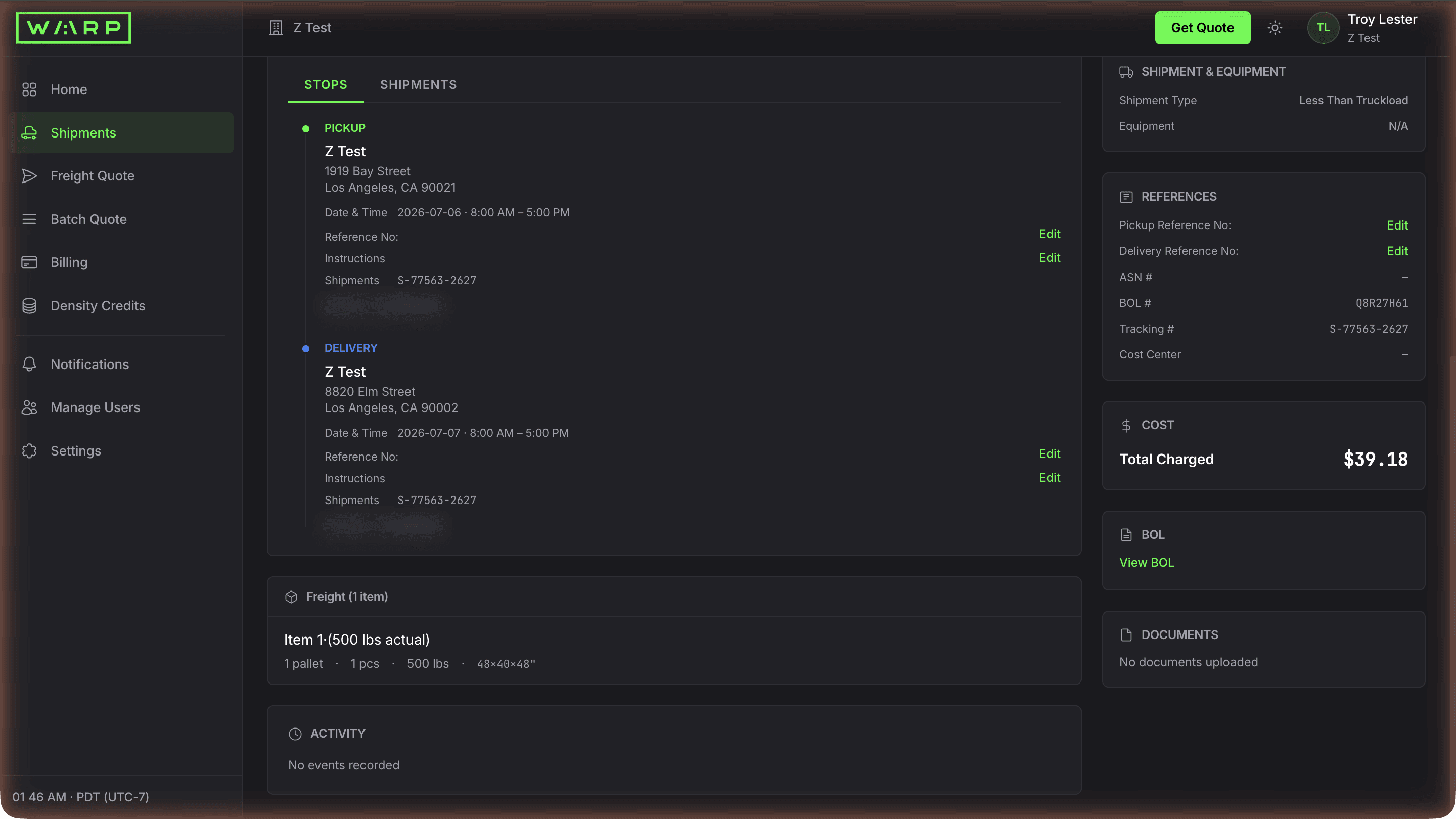
Scroll the shipment detail. The Stops tab shows pickup and delivery addresses with dates, times, and contacts. The freight section lists pallet count, weight, and dimensions. The right rail shows shipment type, all your reference numbers (PO, ASN, BOL, Tracking, Cost Center), total charged, a View BOL link, and a Documents section that updates as POD and other files are uploaded.
References sync into the BOL header and invoice for downstream matching. The View BOL link opens the auto-generated Bill of Lading PDF. Documents and Activity update automatically as the carrier event stream and driver app detect events.
Download the auto-generated Bill of Lading
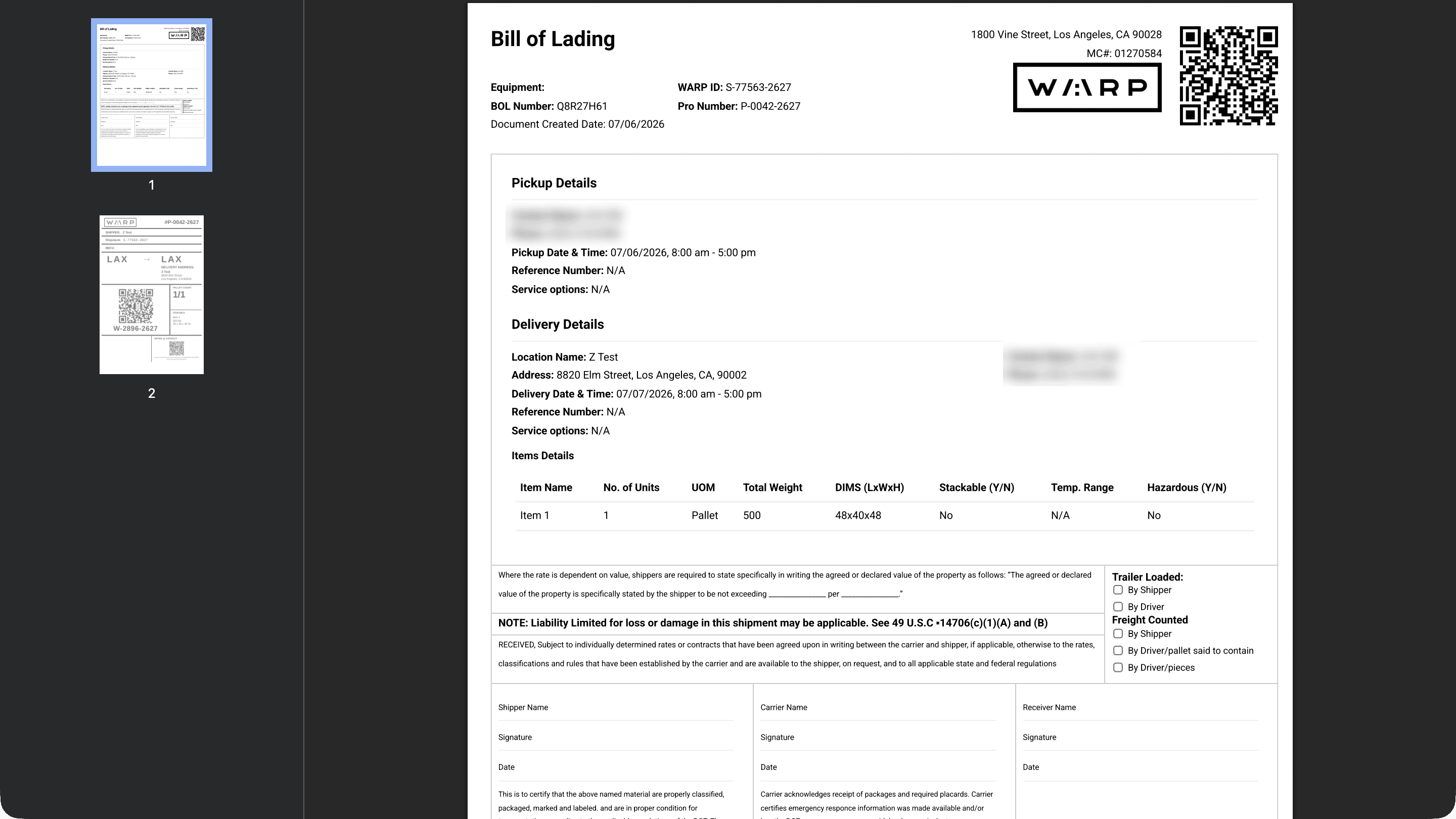
Click View BOL. The PDF is pre-filled with a scannable QR code, your WARP ID, BOL number, pickup and delivery addresses with contacts, an items table with pallet count/weight/dimensions, and the Carmack Amendment liability clause. Signature lines for Shipper, Carrier, and Receiver are ready for pickup.
BOLs are generated server-side from your booking data and stored in encrypted object storage. The QR code encodes the WARP ID for quick dock lookup. Driver signature at pickup is captured via the Warp driver app, and the signed version replaces the blank one in Documents within minutes.
Share a public tracking link with your consignee

Click Tracking Link from any shipment detail. The public page shows a live map, estimated delivery date and window, status, and the stops list with pallet counts. Recipients can click Receive Updates to subscribe to their own text or email notifications. No login required.
Public tracking strips account-specific data. The Receive Updates button creates a notification subscription tied to the single shipment so the consignee gets text or email updates without a Warp account. Estimated Delivery Date updates as GPS and scan events refine the ETA.
Override notifications on a single shipment
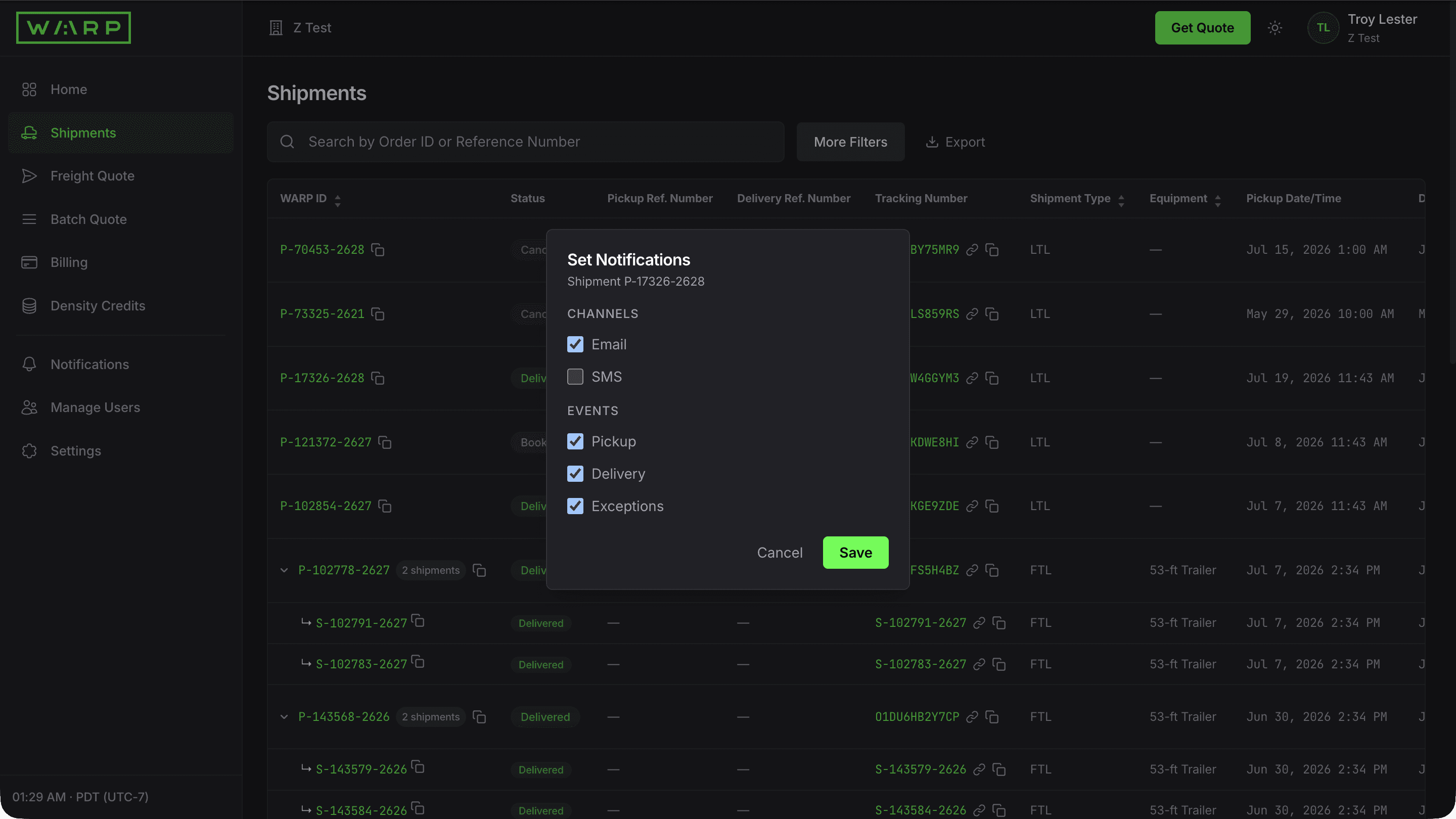
Click the bell icon on any Shipments row. Toggle Email and SMS channels, plus Pickup, Delivery, and Exceptions events, scoped to that one shipment. Use this when a high-value load needs alerts that differ from your global defaults.
Per-shipment overrides are stored as deltas on top of your account-level defaults. The notification service checks per-shipment rules first, then falls back to global preferences. Overrides expire when the shipment hits Completed.
Set global notification preferences per event and channel
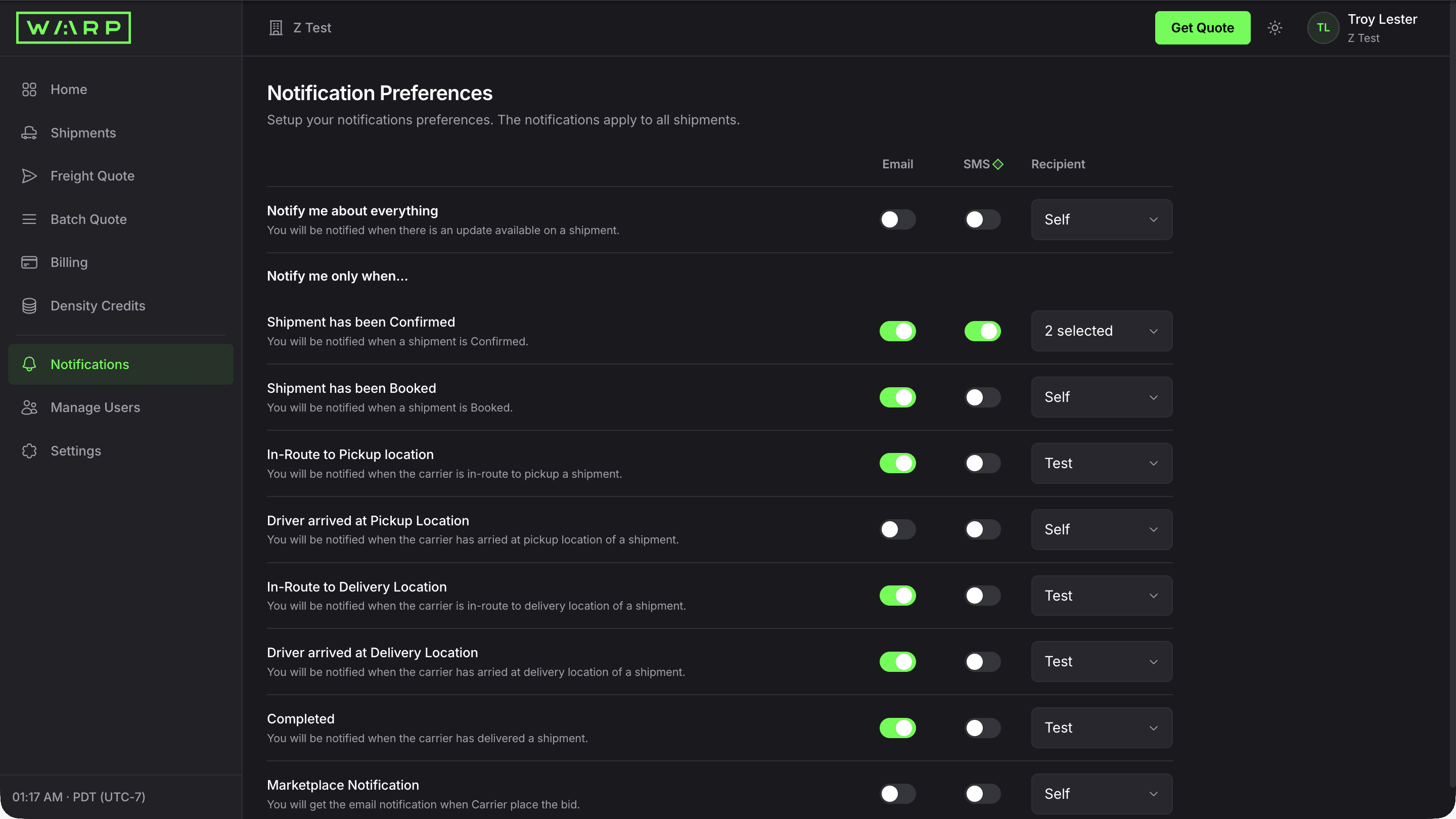
Click Notifications in the sidebar. Toggle Email or SMS independently for each milestone: Confirmed, Booked, In-Route to Pickup, Driver Arrived at Pickup, In-Route to Delivery, Driver Arrived at Delivery, and Completed. Set a different recipient per event using the dropdown.
Notifications fire through Twilio (SMS) or Postmark (email) within seconds of each event. Every notification includes a deep link back to the shipment detail page.
Add notification recipients beyond yourself
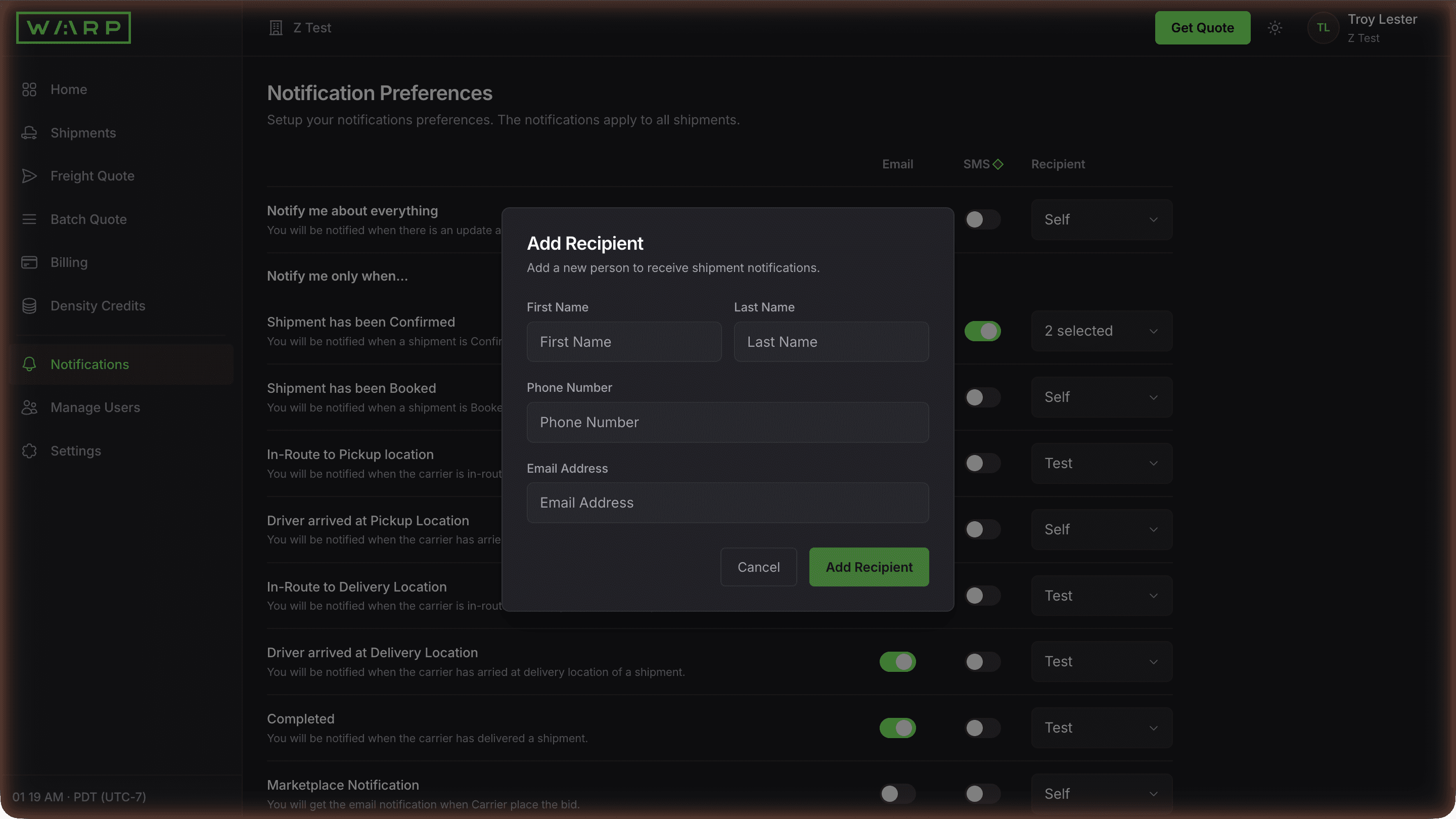
Open the Recipient dropdown on any event and click Add Recipient. Enter the recipient's name, phone number, and email address. They appear in the Recipient dropdown for every event so you can route alerts to warehouse managers, sales reps, or partners without giving them dashboard access.
Recipients are stored alongside your team but cannot log in. They only receive notifications. This lets you alert external partners without granting dashboard access or counting against your seat limit.
Invite teammates with role-based access
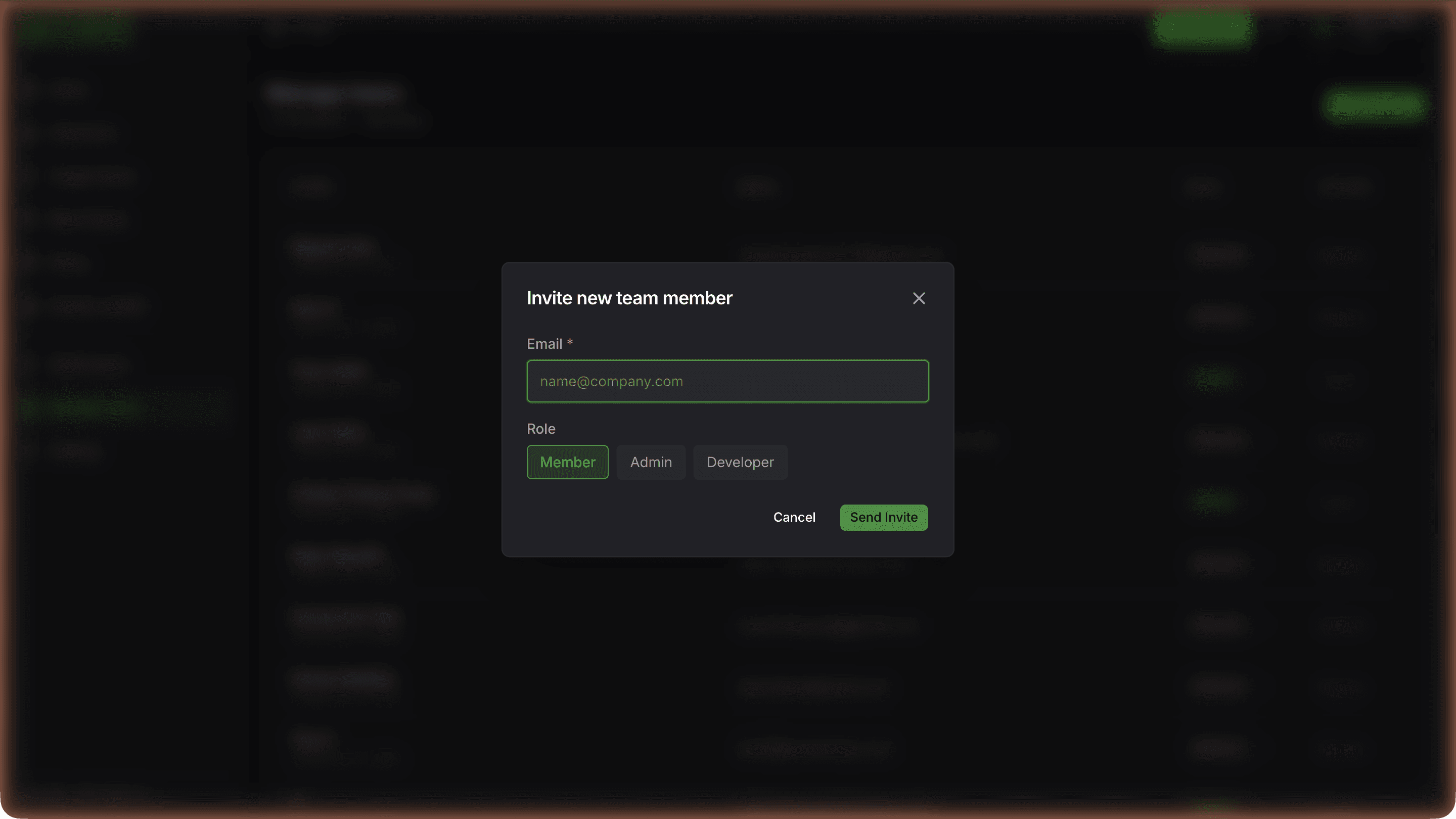
Click Manage Users, then Invite User. Enter their email and pick a role: Member (book and track), Admin (full access including team and billing), or Developer (API keys and webhooks). They receive a magic-link email to set up their login.
Invites use a secure magic-link email, no password sharing required. Roles control access scope. Audit logs track every action by user.
API keys, webhooks, and dark mode
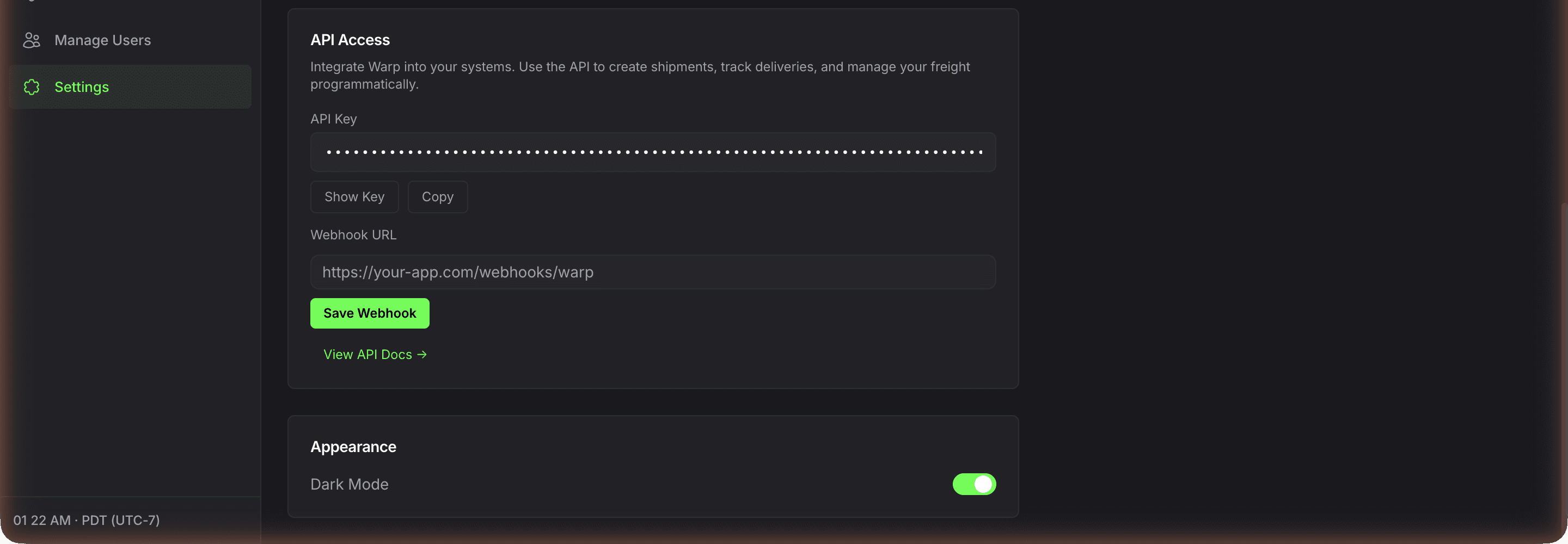
Open Settings. Under API Access, copy your API key or click Show Key to reveal it. A Webhook URL field is available; outbound event push activates on approved accounts. View API Docs links to wearewarp.com/freight-api. Under Appearance, toggle Dark Mode.
API keys give programmatic access to quoting, booking, tracking, invoices, and documents across all four modes. Track shipments by polling GET /api/v1/track and GET /api/v1/events; outbound webhook push is available on approved accounts. Full API reference at wearewarp.com/freight-api.
How online freight booking works on Warp
Enter your origin zip, destination zip, pallet count, weight, and dimensions. Warp returns live all-inclusive rates from multiple carriers for cargo van, box truck, and dry van in one screen.
Pick the rate that fits your shipment, add optional cargo insurance up to $1M, and confirm the booking. You get a PRO number, carrier assignment, and pickup window instantly.
The entire flow from first quote to confirmed booking takes under 2 minutes with no phone calls and no broker in the middle.
Why shippers switch from brokers to self-service freight
Traditional freight brokers require phone calls, email chains, and hours of waiting for rate callbacks. The Warp self-service portal eliminates that friction.
You see real-time rates from real carriers, compare options across vehicle types, and book on your own timeline.
Every rate is all-inclusive with no hidden surcharges, no fuel adjustments, and no post-delivery reclassification.
Operations teams shipping 1 to 50 loads per week save hours per week on quoting alone, and the rate transparency means no more invoice disputes.
Freight shipping cost examples across common lanes
Sample all-inclusive LTL rates from the live network: Los Angeles to San Francisco $260 per pallet, San Francisco to Sacramento $142, Columbus to Chicago $193, New Jersey to Miami $288, Chicago to New Jersey $235, Columbus to Los Angeles $366, Los Angeles to Dallas $398, LA to Phoenix $244.
Rates include pickup, line-haul, cross-dock, and delivery with no fuel surcharge and no reclassification risk. For live pricing on your exact lane, enter origin and destination zips in the quote tool.
Your freight management dashboard
After booking, the Warp dashboard is your freight command center.
Track every shipment with live GPS, download BOLs and proof of delivery, manage team access with role-based permissions, configure notification preferences per lane or shipment, and review cost breakdowns and invoices.
The dashboard supports operations teams with multi-user access, bulk shipment uploads via CSV, API key generation for TMS and ERP integrations, and connections to Shopify, ShipStation, QuickBooks, and NetSuite.
Orbit, the AI operations layer, monitors every load 24/7 and flags exceptions before they become problems.
Frequently asked questions
How do I get an instant freight quote online without signing up?
Go to customer.wearewarp.com/public/freight-quote. Enter your origin zip code, destination zip code, number of pallets, total weight, and dimensions. Click Get Rates.
The portal returns live all-inclusive rates for cargo van, 26-foot box truck, and 53-foot dry van side by side within seconds. No account, no signup, no sales call required to see rates.
The quote screen shows carrier name, transit time, and total cost for each option so you can compare freight rates from multiple carriers before committing.
Can I book freight online without calling a broker?
Yes. The Warp self-service portal replaces the traditional freight broker workflow entirely.
You quote, compare, and book freight online in under 2 minutes with no phone calls, no email chains, and no waiting for a broker to source capacity.
Enter your shipment details, compare live rates from multiple carriers, select the one you want, and confirm the booking. You get a PRO number, carrier assignment, and pickup window immediately.
The entire process from quote to confirmed booking is self-service.
How do I compare freight rates from multiple carriers?
When you enter shipment details in the quote tool, Warp returns rates from multiple carriers in the network side by side.
You see carrier name, all-inclusive rate, and estimated transit time for each option across cargo van, box truck, and dry van. This is not a single-carrier quote tool.
It is a multi-carrier freight rate comparison built into the booking flow, so you can pick the best combination of price and speed for every shipment.
What types of freight can I ship through the self-service portal?
The portal supports three vehicle types: cargo van for small urgent loads and cartons, 26-foot box truck for 1 to 12 pallets, and 53-foot dry van for full truckload shipments.
You can ship LTL (less-than-truckload) pallet freight, FTL (full truckload), and final-mile deliveries through the same quote flow.
Specialty options like liftgate delivery, inside delivery, residential delivery, and temperature-controlled freight are available as add-ons during booking.
What US areas does Warp cover for freight pickup and delivery?
Warp provides nationwide freight coverage across all 50 US states through a network of 70+ cross-dock facilities and 38,000+ carriers.
Local LTL same-day and next-day service is available in major metros including Los Angeles, Phoenix, Denver, Dallas, Chicago, Atlanta, Miami, New York, Boston, Philadelphia, Seattle, and Portland.
Regional LTL covers adjacent cross-dock metros in 2 to 3 business days. National LTL and dry van FTL serve every zip code in the continental US.
Enter your origin and destination zips in the quote tool to confirm service availability and transit time for your specific lane.
How fast can Warp pick up my freight after I book?
Same-day pickup is available in most major US metros for loads booked by 10:30am local time.
Same-day pickup is not guaranteed and depends on whether the delivery location requires a scheduled appointment, the operating hours of your shipper location, and carrier availability on the lane.
Next-day pickup is available nationwide on LTL, box truck, and dry van for loads booked the prior day.
For time-critical freight, the quote tool shows the earliest available pickup window for each carrier option so you can compare speed alongside price, and your shipment detail page confirms the actual pickup window after booking.
How much does it cost to ship freight through the portal?
Freight shipping cost depends on origin, destination, pallet count, weight, dimensions, and vehicle type. Typical LTL rates on Warp run 24% lower than traditional terminal carriers.
Sample all-in rates from the network: LA to SF $260 per pallet, NJ to Miami $288, Chicago to NJ $235, LA to Dallas $398, Columbus to Chicago $193.
FTL rates for 53-foot dry van are live-priced per lane. All rates are all-inclusive with no fuel surcharges, no accessorial surprises, and no post-delivery reclassification.
Enter your shipment details in the quote tool to see exact pricing.
Are there hidden fees, fuel surcharges, or reclassification charges?
No. Warp LTL pricing is flat per pallet and all-inclusive. There are no fuel surcharges, no freight class lookups, no NMFC codes, and no reclassification adjustments after delivery.
The rate you quote is the rate on your invoice.
This eliminates the 20 to 40% cost inflation that traditional class-based LTL carriers add through surcharges, accessorials, and post-shipment class disputes.
The only extras are optional add-ons you explicitly select at booking (liftgate, inside delivery, cargo insurance) which are shown in the cost breakdown before you confirm.
What payment methods does Warp accept? Credit card, ACH, or NET terms?
Self-service bookings accept credit card (Visa, Mastercard, American Express, Discover) with payment collected at booking. ACH and wire transfer are available for higher-volume accounts.
NET 30 payment terms are available to qualified business accounts after a brief credit review, typically for shippers with recurring volume of 5+ shipments per month.
To request NET terms, create an account and contact your Warp rep, or request terms directly from the billing section of your dashboard.
How do I track a freight shipment online in real time?
Log in at customer.wearewarp.com and go to the Shipments tab. You can filter by status (Created, In Progress, Completed) or search by reference number, tracking number, or BOL number.
Click into any shipment to see the detail page with a live GPS map, event timeline from pickup scan to delivery confirmation, cost breakdown, and all associated documents.
GPS updates come from the Warp driver app in real time. Orbit, the AI operations layer, flags exceptions like late pickups or route deviations proactively.
What do the shipment statuses mean in the freight dashboard?
Created means the shipment is booked but not yet picked up.
In Progress means a carrier has been assigned and the load is moving, this covers everything from dispatch through pickup, transit, and cross-dock handling.
Completed means the shipment has been delivered and proof of delivery has been captured.
If a shipment shows an exception flag, it means Orbit detected an issue like a late pickup or route deviation, click into the shipment for details and resolution steps.
How do I book a shipment after getting a freight quote?
After the quote results load, select the rate you want by clicking Book on that carrier row. If you are not logged in, you will be prompted to create an account or sign in.
Account creation takes under a minute.
On the booking confirmation screen, review the pickup and delivery details, add any accessorials (liftgate, inside delivery, limited access), and optionally add Falvey cargo coverage up to $1M with one click.
Confirm the booking and you will see a confirmation page with your PRO number, pickup window, and carrier assignment.
Can I ship freight to a residential address or location without a loading dock?
Yes.
Liftgate-equipped box trucks and LTL carriers are available for deliveries to residential addresses, retail storefronts, construction sites, restaurants, and any location without a standard loading dock.
Toggle liftgate at pickup or liftgate at delivery during booking, and the rate updates in real time.
Inside delivery (driver brings the pallet to a specified interior location) and residential delivery accessorials are also available.
Drivers operate the liftgate and handle pallet jack delivery to the curb or accessible interior locations.
Can I ship hazmat, refrigerated, or temperature-controlled freight?
Yes for approved hazmat classes including limited quantity, ORM-D, Class 3 (flammable liquids), Class 8 (corrosives), and Class 9 (miscellaneous).
Provide UN number, hazard class, packing group, and quantity at quote time.
Temperature-controlled freight is available through reefer FTL for nationwide dry goods, food, beverage, pharma, and perishables.
Temperature-controlled box trucks are available in most major metros for last-mile and urban delivery. Specify temperature range (ambient, chilled 33-45F, frozen below 0F) at quote time.
For non-standard specialty freight, contact customer support at +1 213 267 1373.
Can I ship oversized, overweight, or over-dimensional freight?
Standard shipments up to 45,000 lbs per 53-foot dry van and 8 feet wide, 8 feet tall, 53 feet long are supported through self-service.
For over-dimensional, overweight, or specialty heavy haul requiring permits, escorts, or flatbed equipment, book through the enterprise path or contact customer support at +1 213 267 1373 for custom routing.
Cargo van handles up to 3,000 lbs, box truck handles up to 10,000 lbs across 1 to 12 pallets, and dry van FTL handles up to 45,000 lbs across 24+ pallets.
Is there a minimum or maximum shipment size?
There is no minimum. Cargo vans handle cartons, cases, and parcels for small urgent freight. Box trucks handle 1 to 12 pallets. LTL handles 1 to 12 pallets on cross-dock routes.
FTL provides dedicated 53-foot trailers for full loads up to 45,000 lbs. The self-serve quote tool shows available options and pricing for any shipment size so you can see what fits before committing.
What documents do I need to ship freight? Do I create my own Bill of Lading?
Warp generates the Bill of Lading (BOL) automatically from your booking details. You do not need to create or provide your own BOL.
After booking, download the pre-filled BOL from the shipment detail page and have it ready at pickup for the driver to sign.
Required information at booking: pickup and delivery addresses, contact names and phone numbers, pallet count, weight, dimensions, and commodity description.
Note: Warp does not ship hazmat or international freight — those shipments need a specialty broker.
What happens if my freight arrives damaged or with missing pallets?
Note any visible damage or shortage on the delivery receipt before the driver leaves, and take photos immediately.
File a claim within 9 months of delivery through the Warp online claim form (linked from wearewarp.com/tools/claims-dashboard) with photo documentation, commercial invoice, and signed BOL.
Every shipment includes Carmack Amendment carrier liability up to $100,000 at no extra cost. If you added Falvey cargo insurance during booking, additional coverage up to $1M applies.
Claims are reviewed within 30 days. For status updates email claims@wearewarp.com with your claim ID. For immediate issues at delivery, contact customer support at +1 213 267 1373.
How do I add cargo insurance when booking freight online?
During the booking flow, after selecting your rate, you will see an option to add Falvey cargo insurance.
Toggle it on, enter your declared cargo value (up to $1M), and the premium is calculated instantly and shown in the cost breakdown.
The insurance certificate generates immediately after booking and is downloadable from the shipment detail page under Documents.
Every shipment already includes standard Carmack Amendment carrier liability up to $100K at no extra cost, so Falvey coverage is optional additional protection.
To estimate your premium before booking, use the Freight Insurance Calculator at wearewarp.com/tools/freight-insurance-calculator.
How do I add accessorials like liftgate or inside delivery to a freight shipment?
During the booking step, after you select a rate, the confirmation screen includes toggle options for common accessorials: liftgate at pickup, liftgate at delivery, inside delivery, residential delivery, limited access, and appointment scheduling.
Toggle the ones you need and the rate updates in real time before you confirm. If you need a specialty accessorial not listed, contact Warp customer support at +1 213 267 1373.
Can I ship pallets online without using a traditional LTL carrier?
Yes.
Warp operates a hub-and-spoke network of leased and partner cross-docks and manages 38,000+ carriers, so pallet shipments move through a dedicated freight network instead of the traditional terminal LTL system.
This means no freight class lookups, no NMFC codes, no density-based reclassification, and no surprise surcharges after delivery.
You enter pallet count, weight, and dimensions, and the quoted rate is the invoiced rate. Pallet shipping through Warp is flat-rate, all-inclusive, and bookable online in under 2 minutes.
Does Warp ship to Canada or Mexico? Cross-border freight options
Canada, yes.
Full truckload (53 ft dry van) prices live on Canadian postal codes in the Warp quote form and through the API: US to Canada, Canada to US, and within Canada, with a firm all inclusive rate and online booking under a free account.
See wearewarp.com/truckload/canada for live lanes. Pallet shipments to and from Canada price on the same quote screen through LTL carrier partners.
Clearance runs through your customs broker, with the commercial invoice, certificate of origin, and CUSMA paperwork travelling with the load. Warp does not serve Mexico.
How do I use the promo code for $50 off my first shipment?
During the booking confirmation step, look for the promo code field below the cost breakdown. Enter WARP2026 and click Apply. The discount of $50 is applied to that shipment.
The code works once per shipment across all vehicle types and lanes. The updated total reflects the discount before you confirm the booking.
How do I add team members to the freight management dashboard?
Go to Manage Users in the dashboard sidebar.
Click Invite User, enter the email address, and pick a role: Member (book and track shipments), Admin (full access including team and billing), or Developer (API key access for integrations).
Invited users receive a secure magic-link email through our auth provider, set their own credentials, and inherit the role-scoped access. You can remove users at any time from the Manage Users panel.
How do I set up freight shipment notifications and alerts?
Go to Notifications in the dashboard sidebar.
You can configure email, SMS, or Slack alerts per event: Shipment Confirmed, Shipment Booked, In-Route to Pickup Location, Driver Arrived at Pickup Location, In-Route to Delivery Location, Driver Arrived at Delivery Location, and Completed.
Set recipients per event (Self or any team member). Enable Email, SMS, or Slack per event independently so different stakeholders get only the updates they need.
Slack integration is available as a channel alongside email and SMS.
Can I upload multiple freight shipments at once for bulk quoting?
Yes. The Batch Rating tool lets you upload a CSV or spreadsheet with multiple shipments and get rates for all of them in one pass.
Go to wearewarp.com/tools/batch-rating or access it from the Tools section in your dashboard. Upload your file with origin, destination, pallet count, weight, and dimensions per row.
Warp returns rates for each shipment across available vehicle types. You can then book individual loads or book all at once. This is built for operations teams managing 10+ shipments per day.
Can I download my BOL, proof of delivery, or freight invoice from the portal?
Yes. Open any shipment from the Shipments tab and scroll to the Documents section on the detail page.
You will see downloadable files for the Bill of Lading (BOL), Proof of Delivery (POD) with photos and electronic signature, insurance certificate if Falvey coverage was added, and the commercial invoice.
Click the download icon next to any document. For bulk document retrieval across multiple shipments, use the BOL Vault tool at wearewarp.com/tools/bol-vault.
Can I edit or cancel a freight booking after confirming?
You can edit shipment details (reference numbers, contact info, pickup instructions) from the shipment detail page as long as the carrier hasn't been dispatched.
To cancel, click Cancel Shipment on the detail page or call +1 213 267 1373. Cancel free any time before your carrier is dispatched and the charge is refunded in full.
After dispatch, the only charge is the truck ordered not used fee on our published tariff: $85 for 1 to 5 pallets, $150 for 6 to 12, $250 over 12 on Warp LTL, and $350 for a full truckload.
Partner carrier rates follow that carrier's own cancellation terms. A person confirms pickup status with the carrier and refunds the balance to your card.
Can I connect Warp to Shopify, ShipStation, QuickBooks, NetSuite, or my ERP?
Yes. Log in to your dashboard and go to the Developer section in the sidebar. Click Generate API Key.
Your key gives programmatic access to quoting, booking, tracking, invoices, and documents across all vehicle types.
The Warp Freight API connects to Shopify, ShipStation, QuickBooks, NetSuite, SAP, Oracle, and any TMS, WMS, or ERP with REST support.
Webhook endpoints push real-time status events (pickup, delivery, exception, POD) directly to your system. No sales call required to get API access. Full documentation is at wearewarp.com/freight-api.
How is Warp different from FedEx Freight, XPO, or traditional freight brokers like FreightQuote?
Traditional LTL carriers (FedEx Freight, XPO, Old Dominion, Estes) route through terminal networks with freight class pricing, fuel surcharges, and reclassification risk.
Traditional brokers (FreightQuote, uShip, C.H. Robinson) match loads to carriers on the spot market with rate callbacks and manual quoting.
Warp operates a hub-and-spoke network of 70+ leased and partner cross-docks and a dedicated carrier base of 38,000+ carriers, with flat per-pallet pricing, instant multi-carrier quotes, API access without sales calls, and AI operations monitoring via Orbit.
Compare specific carriers at wearewarp.com/compare for detailed breakdowns.
How do I file a freight damage claim?
Go to wearewarp.com/tools/claims-dashboard and click the online claim form, or click File a Claim from the shipment detail page.
Enter your PRO or load number, shipment date, claim type (damage, loss, or shortage), upload photo documentation, attach the commercial invoice and signed BOL, and submit.
Claims must be filed within 9 months of delivery. Email claims@wearewarp.com with your claim ID at any time for a status update. Reviews are completed within 30 days.
Inspect before you sign: note any damage, shortage, missing pieces, or tampering on the POD at delivery.
Under the Warp LTL tariff (item 620), a claim on a clean-signed POD can't be paid, so a photo or an email later doesn't replace the notation.
When should I use self-service freight booking vs. talk to a rep?
Use self-service when you need an immediate freight rate for a specific shipment, typically 1 to 12 pallets that need to move today or tomorrow.
It works best for operations managers handling urgent freight, 3PLs comparing mode options, and shippers who want instant pricing without a sales call.
Talk to a rep when you ship 500+ pallets a month or run the same lanes every week, need custom network design across multiple modes, or want lane-level cost optimization with a dedicated account manager.
Who do I contact if something goes wrong with a freight shipment?
Call Warp customer support at +1 213 267 1373. Dispatch is staffed 6am to 10pm local time Monday through Friday; the support desk is staffed 9 to 5 ET seven days a week, with replies in minutes.
For non-urgent issues, use the support form in the dashboard under Help. Enterprise accounts have a dedicated rep.
Orbit monitors every load 24/7 and routes exceptions to the on-call dispatch team outside those hours, so a missed pickup or a late delivery is flagged before you need to call.
About the Warp freight network
More about the Warp freight network
Warp is the open source freight network: the tech is free and the network is open. We run Warp LTL, our own carrier, Warp FTL, cargo van, box truck and fulfillment ourselves, with every major LTL carrier, parcel, ocean, air and drayage plugged in beside them. Our driver app rides on every truck and our warehouse app runs every cross-dock, so an open network of 38,000+ carriers behaves like one carrier you control. Warp is licensed by the FMCSA as a property broker and freight forwarder, and runs the network itself: instant rates, live tracking, 70+ cross-dock facilities, 14,000+ cargo vans and box trucks, 80%+ US LTL zip-to-zip coverage and nationwide FTL, box truck and cargo van.
The network is supported by 24,000+ vetted FTL carriers.
Unlike traditional brokers, Warp uses AI to match the right vehicle to every load based on weight, dimensions, urgency, and cost targets. Cross-dock operations reduce transit time by eliminating unnecessary terminal transfers.
Pool distribution and zone-skipping programs help enterprise shippers lower per-unit delivery costs while maintaining tight appointment windows.
Self-serve shippers can quote, compare, and book freight online in under two minutes. Enterprise accounts get dedicated capacity planning, committed rate programs, and a named operations team. Every shipment includes scan-level visibility from pickup through final delivery.
Warp operates across the contiguous United States with regional density in the Southeast, Texas, Midwest, and Northeast corridors, and West Coast and Southwest coverage from Los Angeles, Seattle and Phoenix.
Warp operates 70+ cross-dock facilities across the US, with named markets including Chicago, Atlanta, Houston, New York, Savannah, Orlando, Charlotte, Indianapolis, Columbus, Denver, New Orleans, Milwaukee, Dallas-Fort Worth, Nashville, Phoenix, Tampa Bay, Seattle, Los Angeles. They support faster transfers and fewer touches on recurring lanes.
Freight modes and vehicle types
| Mode | Max payload | Max cube | Best for |
|---|---|---|---|
| Cargo van | 3,500 lbs | 400 cu ft | Time-sensitive, last-mile, light pallets |
| Box truck | 10,000 lbs | 1,500 cu ft | Regional distribution, no dock required |
| LTL | Per-pallet | Shared trailer | Lower per-pallet cost via cross-dock routing |
| Dry van / FTL | 42,000+ lbs | Full 53-ft trailer | High-volume lanes, recurring programs |
Cargo vans handle loads up to 3,500 pounds and 400 cubic feet, ideal for time-sensitive deliveries, last-mile retail replenishment, and lightweight palletized freight.
Box trucks carry up to 10,000 pounds and 1,500 cubic feet, fitting most regional distribution and store delivery needs without requiring a loading dock.
Dry vans and full truckloads move 42,000+ pounds for high-volume lanes and recurring programs. LTL shipments share trailer space on optimized routes through Warp cross-docks, reducing per-pallet cost by consolidating multiple shippers on the same vehicle.
Warp does not default every shipment to a 53-foot trailer. The AI engine evaluates load weight, cube, delivery window, and cost to recommend the right vehicle. Shippers see all available mode options with live pricing in one comparison screen before booking.
Cross-dock operations
Cross-docking at Warp facilities keeps freight moving instead of storing it: inbound freight is sorted and transferred directly to outbound vehicles, typically within hours. When inventory does need to sit, Warp's fulfillment centers in Los Angeles, Dallas, Chicago and New Jersey hold it inside the same network, with same day delivery within 30 miles of each.
This reduces dwell time, lowers damage risk, and compresses delivery windows. Warp cross-docks support pallet-in, pallet-out operations with scan-level tracking at every handoff point.
- Atlanta — Southeast retail flow
- Chicago — Midwest manufacturing and replenishment
- Houston — Texas industrial distribution
- New York — dense Northeast delivery
Facility locations are selected for corridor density: Atlanta handles Southeast retail flow, Chicago serves Midwest manufacturing and replenishment, Houston covers Texas industrial distribution, and New York supports dense Northeast delivery. Each facility operates on appointment-based scheduling to prevent congestion and maintain throughput consistency.
Enterprise freight programs
Enterprise shippers get committed rate programs, dedicated account management, and custom SLA design. Warp builds lane-by-lane rate structures that account for volume commitments, seasonal variation, and mode flexibility. Operations teams monitor shipment execution daily and intervene proactively when exceptions occur.
Self-serve freight quoting
Shippers enter origin and destination, load details, and delivery requirements to see live rates across all available modes. Quotes include estimated transit time, vehicle type, and total cost.
Booking takes one click. After booking, shippers track every shipment with real-time GPS location, milestone updates, and proof of delivery documentation.
Industries and use cases
Retail shippers use Warp for store replenishment programs that deliver to hundreds of locations per week on tight appointment windows. Apparel brands use zone skipping to bypass regional parcel sortation and reduce per-unit delivery cost.
Food and beverage companies rely on time-definite delivery for perishable goods. Manufacturing operations use Warp for inbound vendor consolidation, combining multiple supplier shipments into fewer, fuller loads through cross-dock facilities.
Distribution companies use pool distribution to serve multiple delivery points from a single origin, splitting full truckloads at cross-docks into smaller last-mile vehicles.
Urgent freight recovery covers emergency capacity needs when primary carriers fail or demand spikes unexpectedly. Middle-mile optimization reduces cost and transit time on the longest segment of multi-leg shipments.
Ready to ship?
Get instant rates or talk to our team about a custom freight program.
98.2% on-time delivery · $100K carrier liability · Up to $1M coverage · No signup required · Trusted by 2,000+ shippers
Performance figures are computed from Warp network data. See our methodology.
By Troy Lester