
The Warp self-service shipper portal.
One portal to quote, book, track, and manage freight across LTL, FTL, cargo van, and box truck — instead of juggling a dozen carrier logins. Live multi-carrier rates, GPS tracking, auto-generated BOLs, Email/SMS/Slack notifications, role-based team access, and a Freight API at customer.wearewarp.com.
 By Troy Lester, Co-Founder & CRO
98.2% on-time delivery · $100K carrier liability · Up to $1M coverage · 2,000+ shippers · No subscription
Live all-inclusive rates
Get your instant freight quote
Enter your lane and see live, all inclusive rates on the next screen. LTL, FTL, box truck, and cargo van.
- Los Angeles San Francisco$183/pallet$367 under market avg · 624 shipments/mo
- Los Angeles Las Vegas$193/pallet$142 under market avg · 202 shipments/mo
- Newark New York$148/pallet$439 under market avg · 335 shipments/mo
- Dallas Chicago$298/pallet$164 under market avg · 72 shipments/mo
- Newark Miami$264/pallet$367 under market avg · 72 shipments/mo
Tap any lane: ZIPs prefilled, quote in 10 seconds.
All-inclusive pricing: the rate at booking is the rate on the invoice. Market avg from carrier benchmark data.
Warp customers






Every screen in the portal, and what happens behind the scenes.
Real screenshots of customer.wearewarp.com paired with what our systems do when you click — no black box.
Enter shipment details on the public quote page
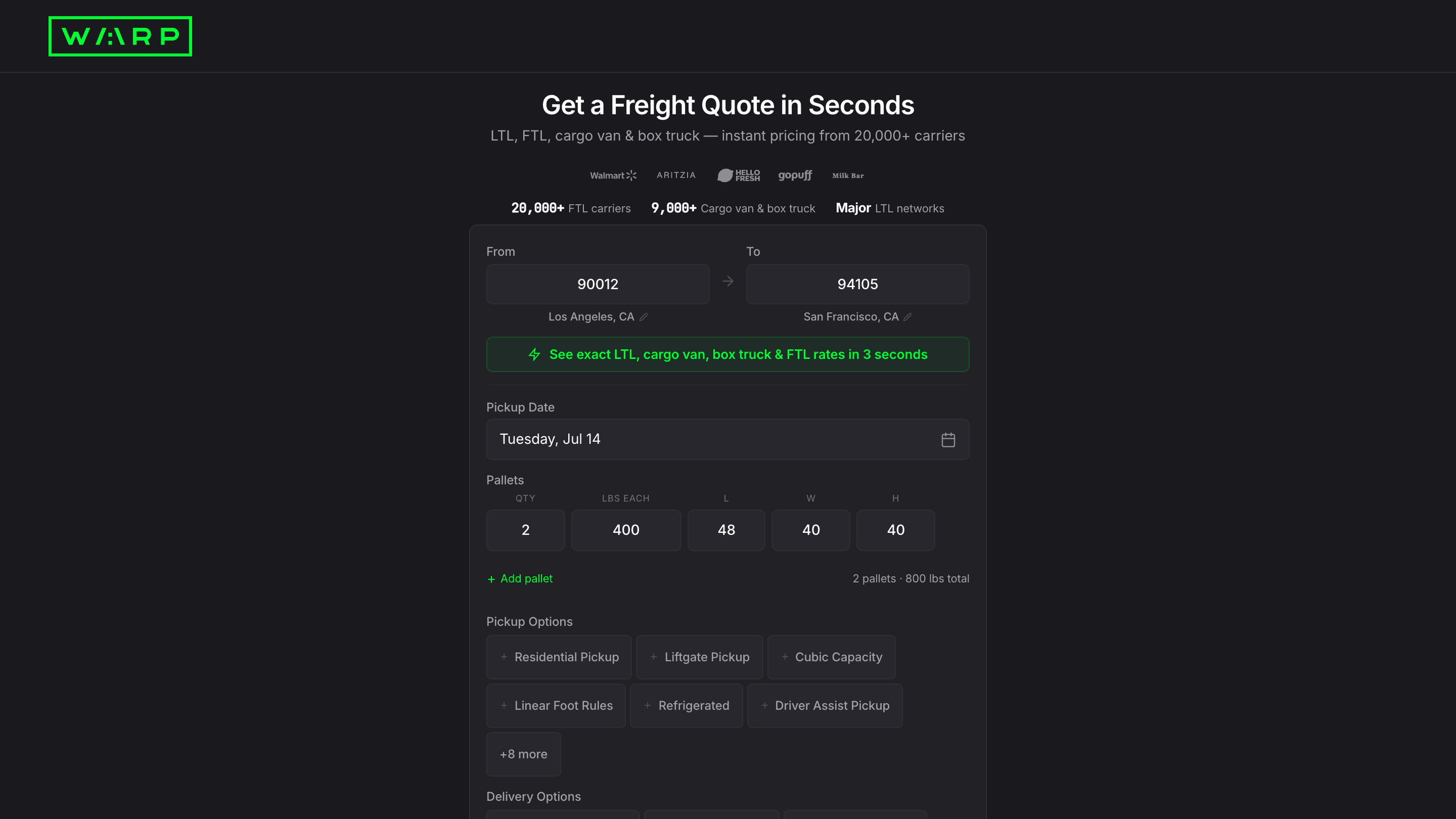
Go to customer.wearewarp.com/public/freight-quote. Enter your origin and destination ZIP codes, pick a date, set pallet count with weight and dimensions, and toggle any services you need (liftgate, residential, refrigerated, driver assist, and more). Click Get Rates. No account required.
The quote page is public: no login, no signup required. The pallet configurator calculates total weight live. Services Needed toggles map to accessorial codes the rating engine uses to include or exclude surcharges. No freight class or NMFC code is required. Warp prices flat per pallet.
Compare live rates and select the best option
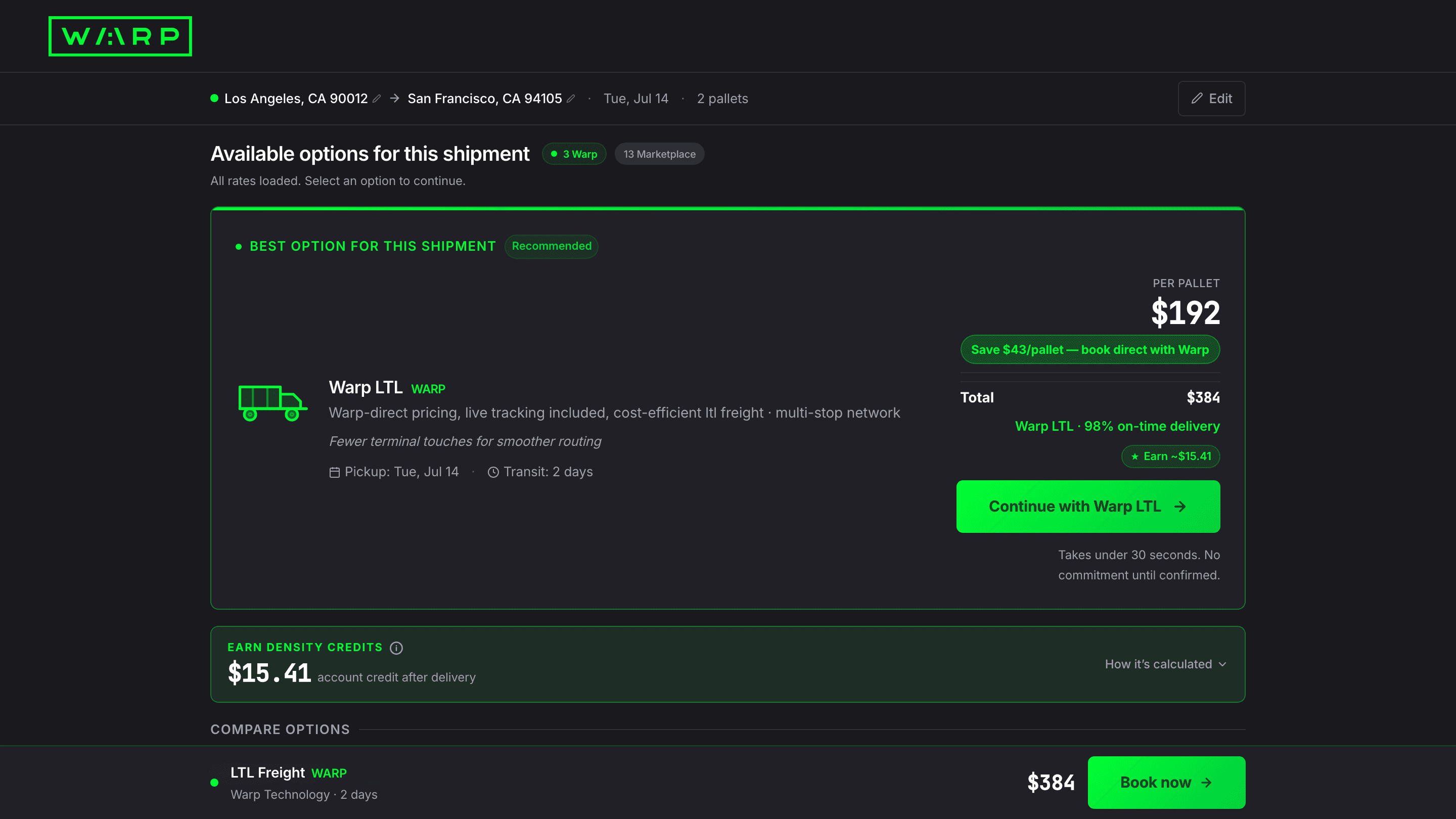
Rates load in under 10 seconds. The top card is flagged Best Option with per-pallet price, total cost, savings vs retail, on-time percentage, and transit time. Click Continue to proceed to checkout, or scroll to see additional carrier options.
The rating engine queries every available carrier and mode on the lane in under 10 seconds. The Best Option tag goes to the lowest all-inclusive per-pallet cost. Rates are locked once you click Continue: no reclassification, no post-delivery adjustments.
Fill pickup details and toggle Falvey cargo insurance
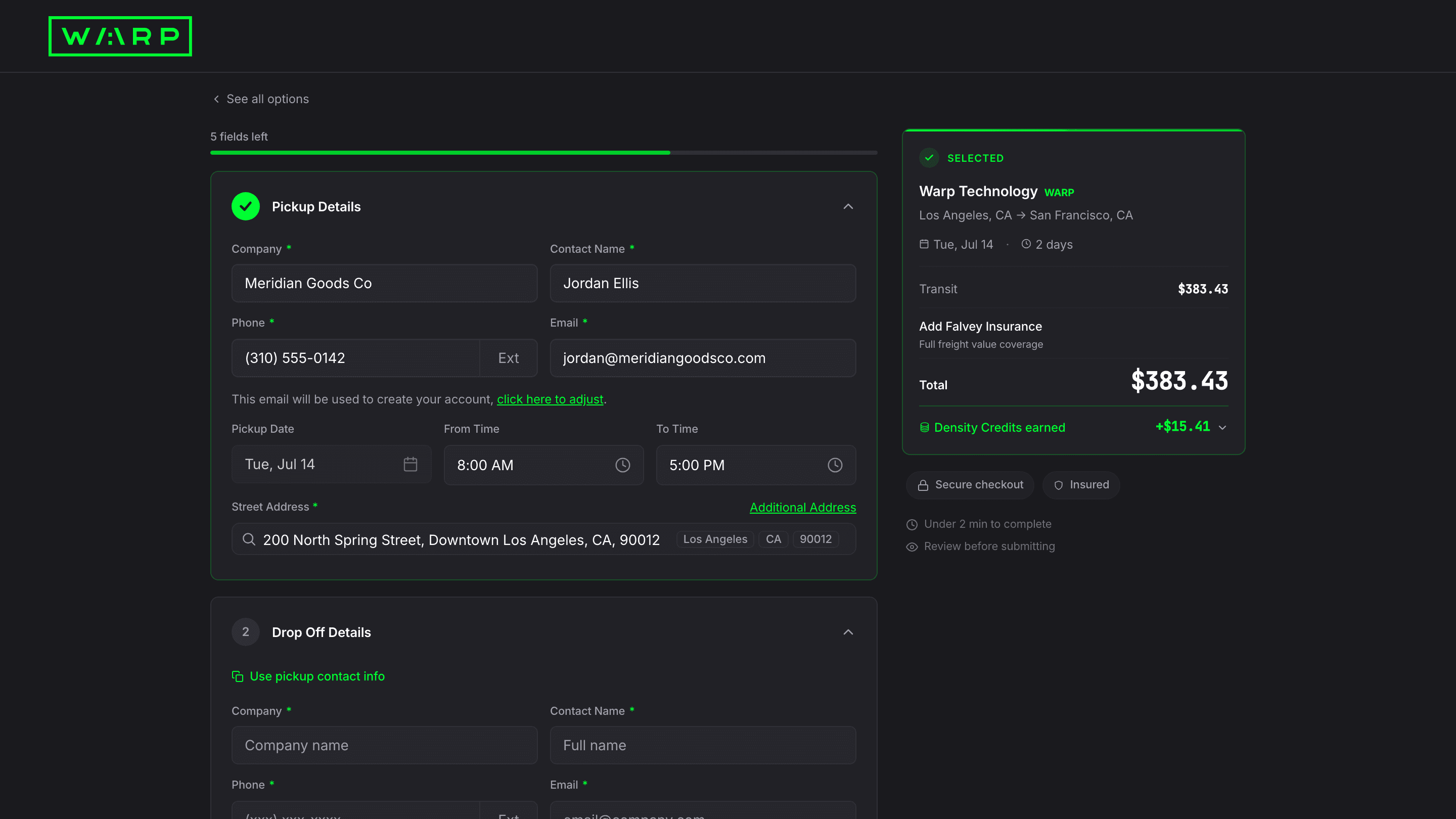
Enter your pickup company, contact, address, and time window. The email you enter becomes your Warp account login. In the sidebar, toggle Add Falvey Insurance to get all-risk cargo coverage. The premium calculates instantly. The sidebar shows your running total with transit cost, insurance, and subtotal.
The email you enter at checkout becomes your Warp account login. The system creates your account as part of the booking flow so you never need a separate signup. Falvey Insurance is powered by Falvey Insurance Underwriters. The insurance certificate generates immediately after booking.
Review Falvey cargo insurance coverage
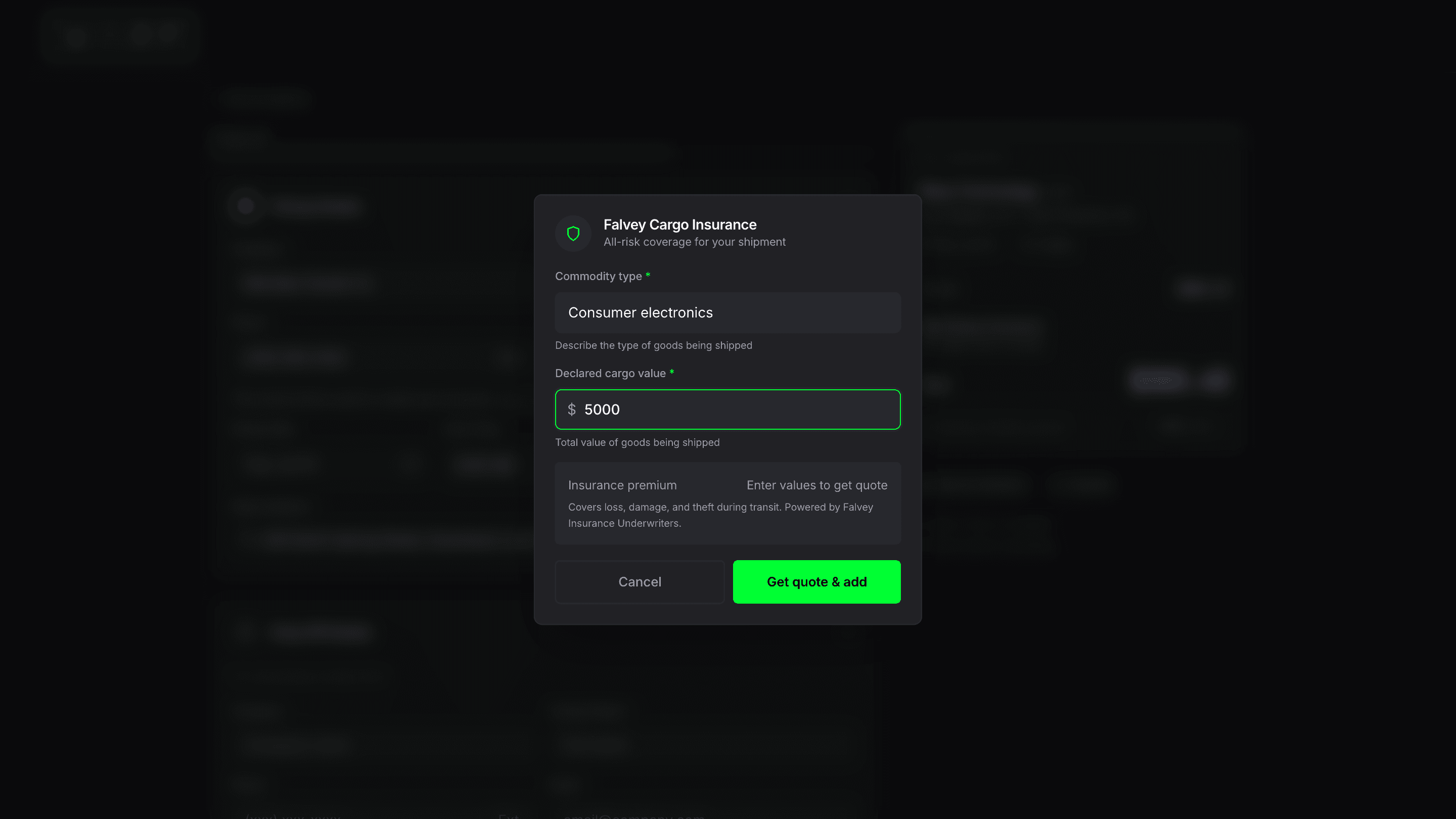
Enter your commodity type and declared cargo value. The premium calculates instantly. Coverage is all-risk: loss, damage, and theft during transit. Every shipment already includes $100K Carmack Amendment liability at no extra cost. Falvey is optional additional protection up to $1M.
Falvey calculates the premium from your commodity type (risk class) and declared value. The premium is typically $30 base plus a $5 processing fee. The insurance certificate generates immediately after booking and is downloadable from your shipment detail page.
Fill drop-off details
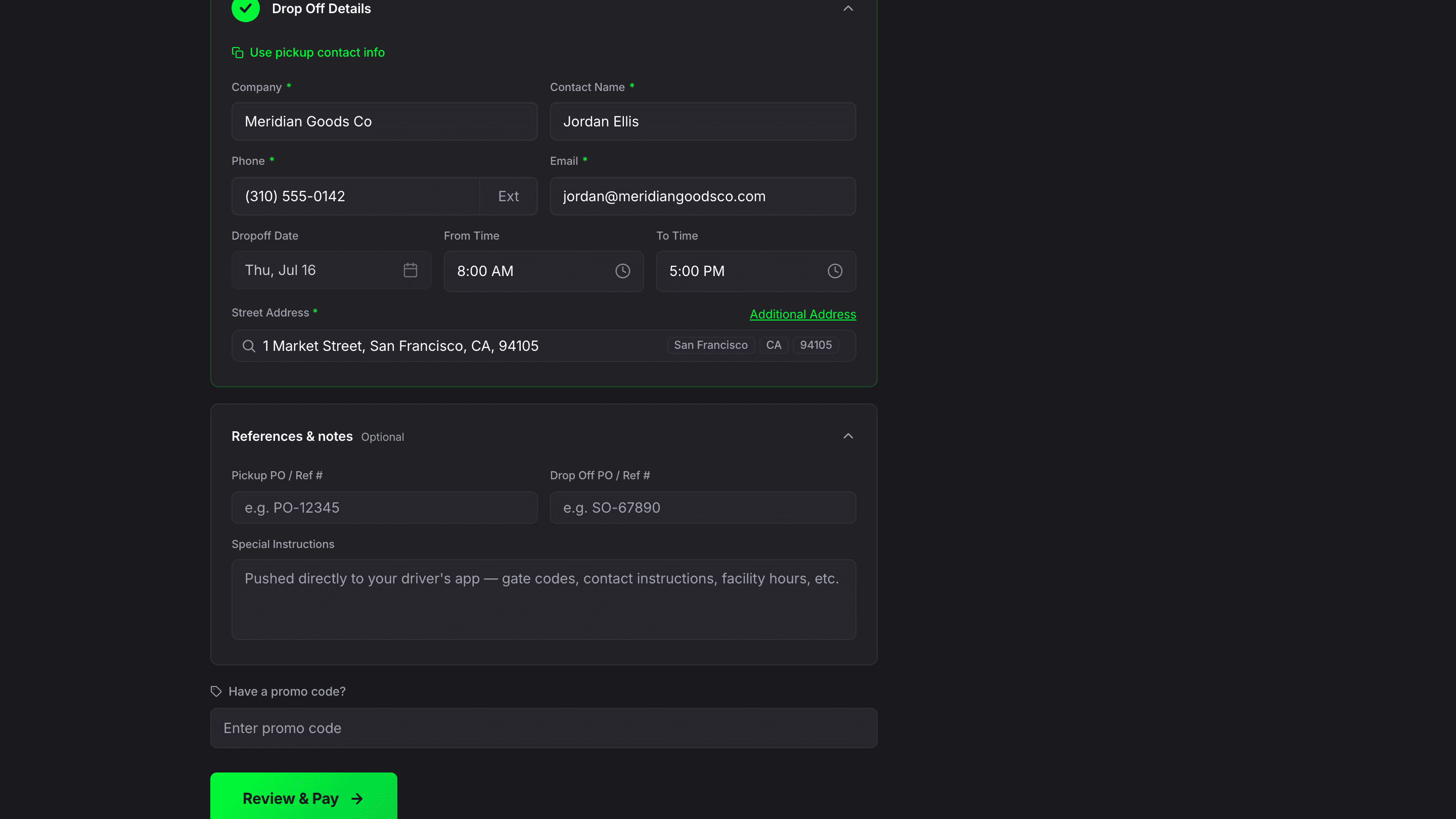
Enter delivery company, contact, address, and time window. Use the shortcut to copy your pickup contact info. The delivery date defaults to the transit-time-based estimate from the rate you selected.
Drop-off details sync into the Bill of Lading as the consignee record. Special instructions entered in the next section push directly to the driver's app so they see gate codes, facility hours, and contact instructions before arrival.
Add references, special instructions, and promo code
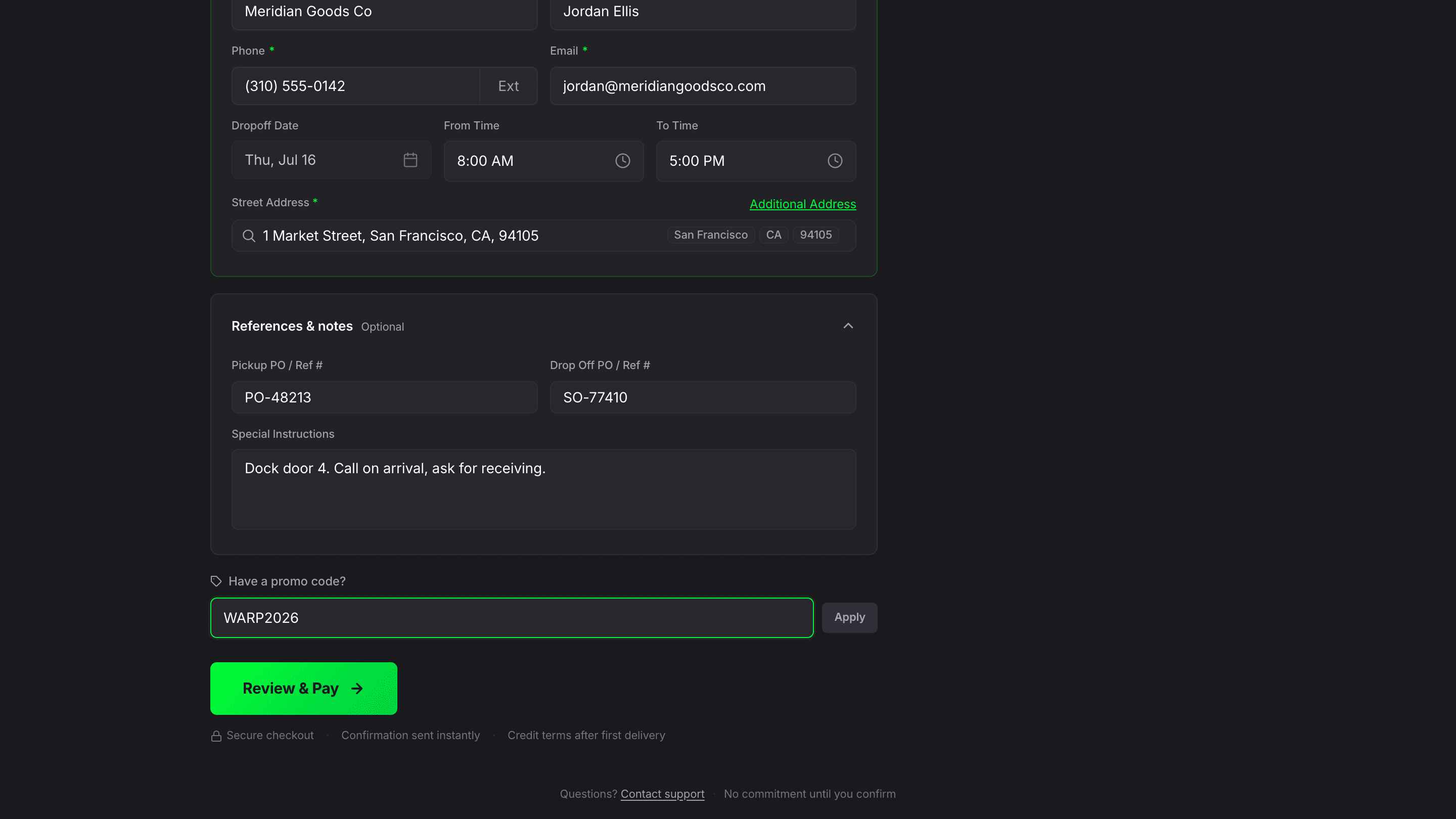
Optionally add pickup and drop-off PO/reference numbers for invoice matching. Enter special instructions (gate codes, facility hours) that push directly to the driver's app. Enter promo code WARP2026 for $50 off your first shipment. Click Review & Pay.
PO and reference numbers sync into the BOL header and shipment record for downstream invoice matching. Special instructions push to the Warp driver app. Credit terms (NET 30) are available after your first completed delivery.
Pay with Stripe and book the shipment
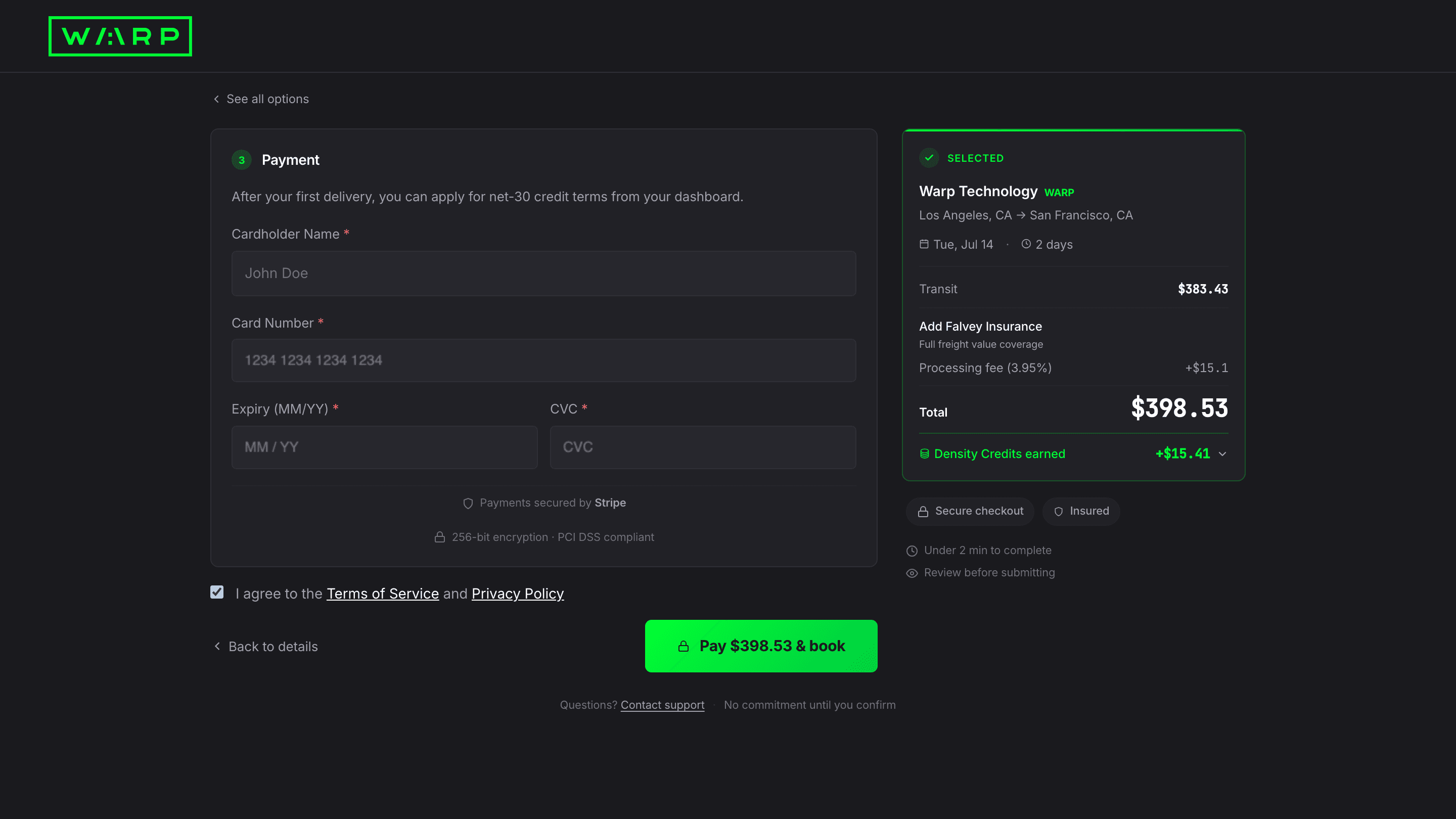
Enter your card details. The sidebar shows the full cost breakdown: transit, insurance (if added), processing fee, and total. Payments are secured by Stripe with 256-bit encryption. Save your card for future bookings. After your first delivery, you can apply for NET 30 credit terms from your dashboard.
Payment is processed through Stripe with PCI DSS compliance. Card details are never stored on Warp servers. After your first completed delivery, NET 30 credit terms eliminate the processing fee on future shipments.
Booking confirmed with instant tracking, BOL, and dashboard access
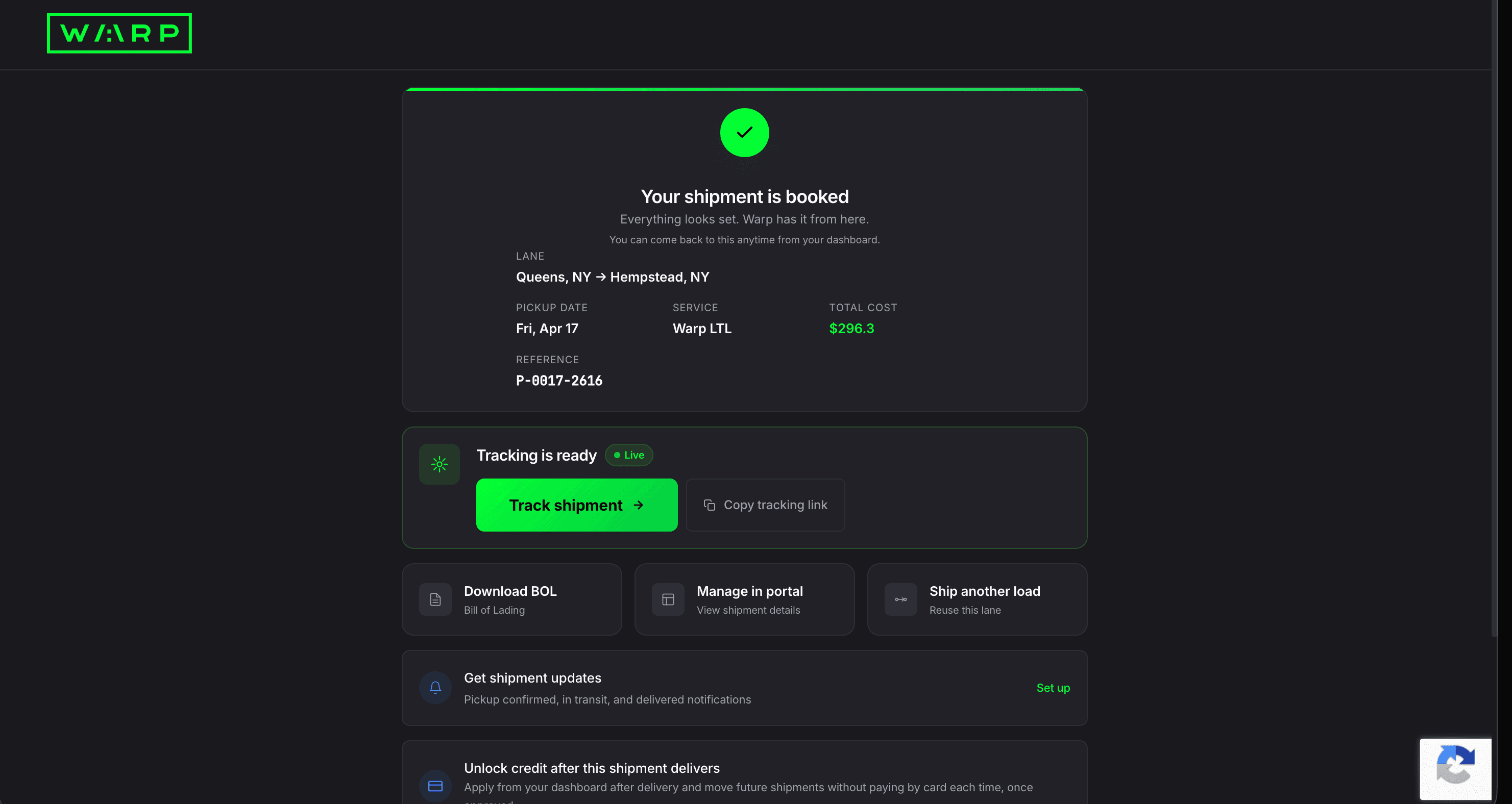
Your shipment is booked. The confirmation shows your lane, pickup date, service, total cost, and reference number. From here you can track the shipment (tracking is live immediately), download the BOL, manage the shipment in the portal, or ship another load on the same lane. Set up notifications for pickup, transit, and delivery updates.
On confirmation, the system creates the shipment record, assigns the carrier, generates the BOL PDF, and activates live tracking, all within seconds. Your Warp account is created from the email you entered at checkout, and a password-setup email is sent so you can access the dashboard going forward.
Public tracking page goes live for your consignee

Copy the tracking link and send it to your consignee. They see a live map with pickup and delivery markers, estimated delivery window, shipment status, and a list of stops with pallet counts. No login required. They can click Receive Updates to subscribe to text or email notifications.
Public tracking strips out account-specific data (cost, references, internal notes). The Receive Updates button creates a notification subscription tied to that single shipment, so your consignee gets text or email updates without needing a Warp account.
Dashboard Home with live stats, density credits, and your shipment map
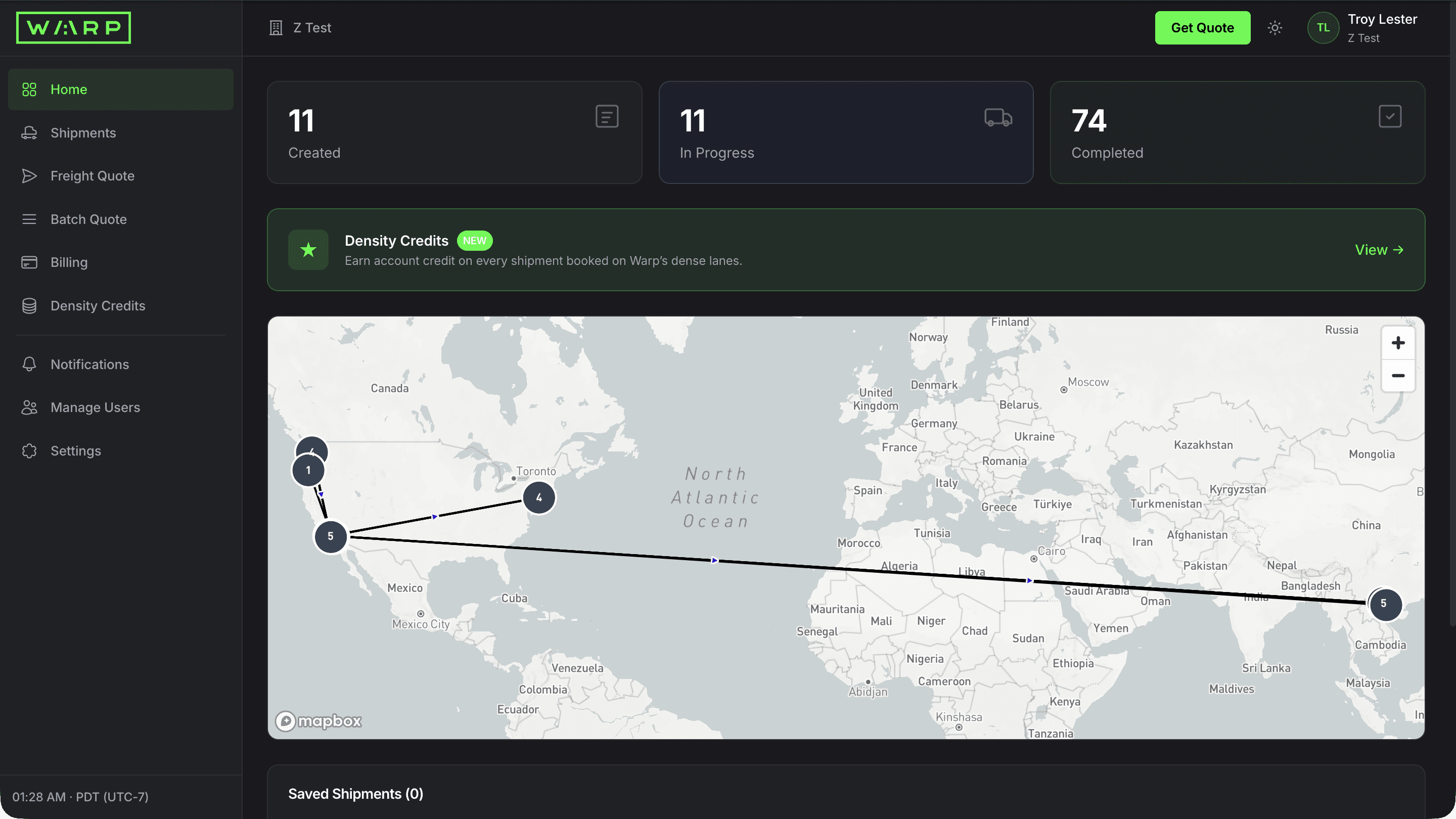
Sign in to land on your dashboard home. Stat cards count your created, in progress, and completed shipments. The Density Credits banner tracks account credit you earn on shipments booked on Warp's dense lanes, and the map plots your shipment locations. Saved shipments sit right below the map.
Stat cards read live from the booking database. Density Credits accrue as account credit after each delivered shipment on eligible dense lanes. The map updates as your shipments move through the network, and bookmarked shipments pin to it for quick access.
Filter and search every shipment
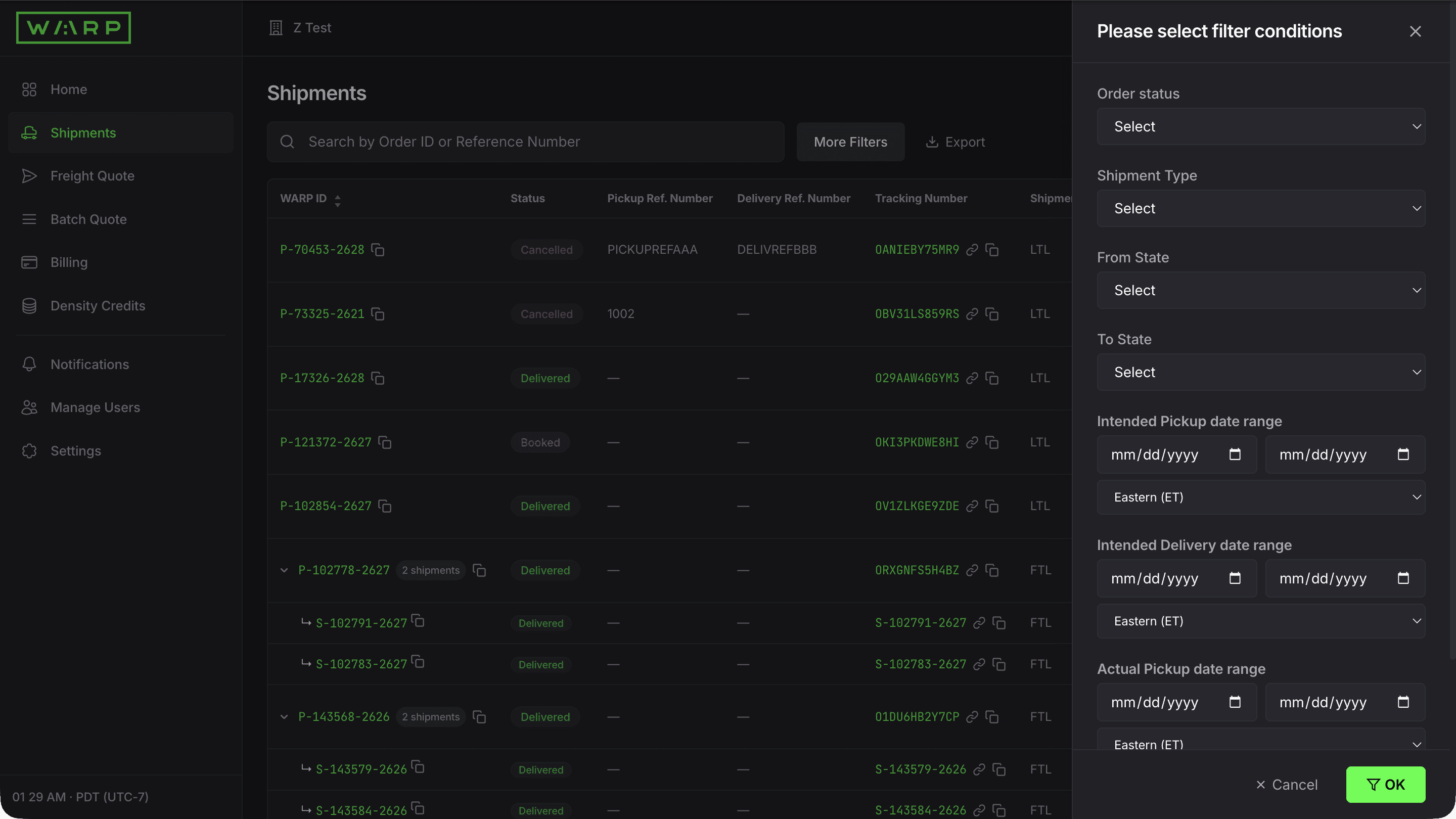
Click Shipments in the sidebar. See every shipment with WARP ID, type, equipment, dates, addresses, cost, and status. Use the search bar to find by Order ID or Reference Number. Click More Filters to slice by status, shipment type, origin/destination state, or date range. Export the filtered list to CSV.
Server-side filtering and cursor-based pagination handle 1,000+ shipments instantly. Export pulls live from the booking database. The bell icon on each row opens per-shipment notification overrides, and Watchlist keeps your key shipments one click away.
Open shipment detail with live GPS map and 4-stage progress
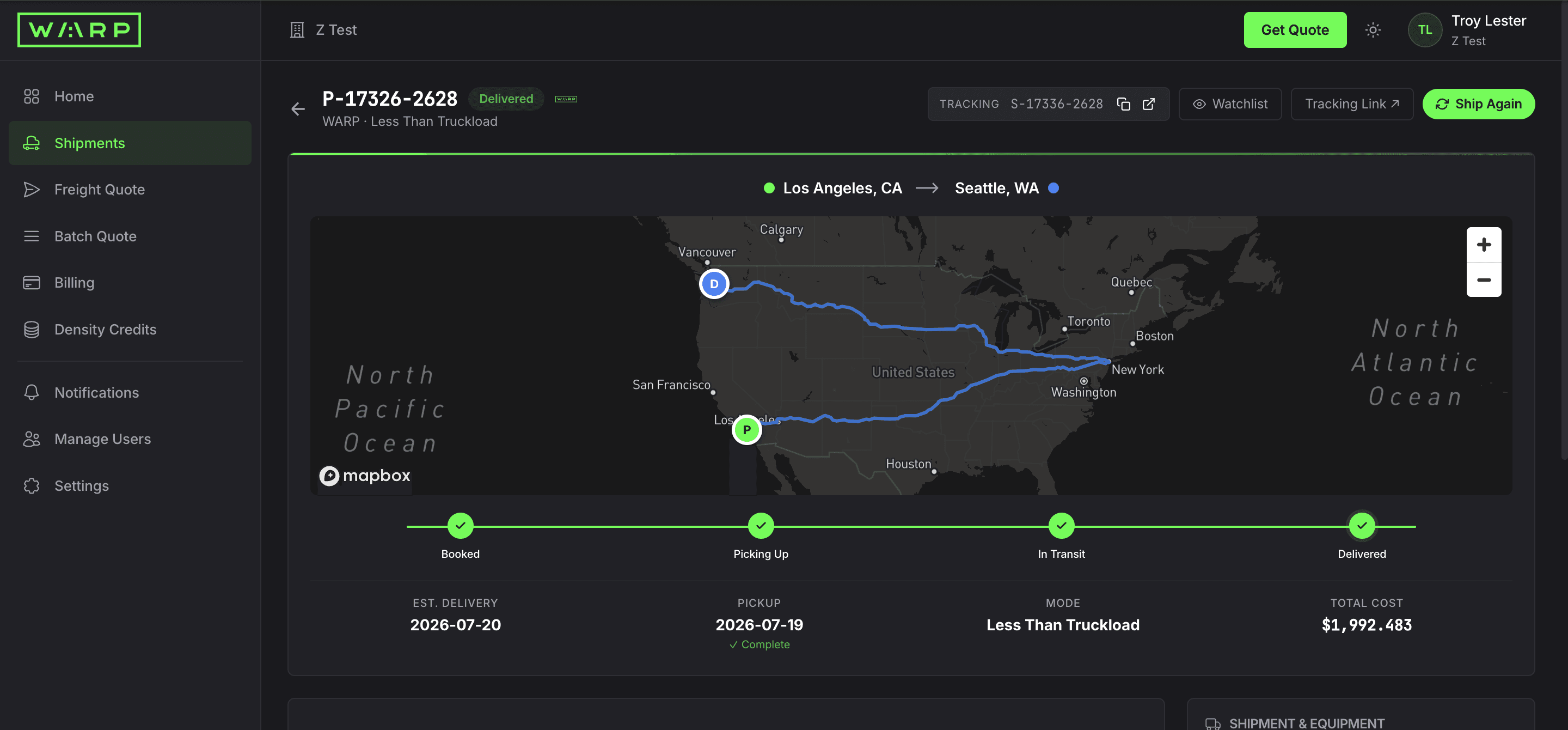
Click any WARP ID. The detail page shows the shipment status, route on a live Mapbox map, and a 4-stage progress bar: Booked, Picking Up, In Transit, Delivered. Below the map you see estimated delivery, mode, and total cost. Use Ship Again to clone the booking, or Tracking Link to share with your consignee.
GPS streams from the Warp driver app every 60 seconds. The 4-stage progress bar updates from carrier events and cross-dock scan-in/scan-out. Ship Again clones the shipment for one-click rebooking on the same lane.
Stops, freight items, cost breakdown, references, BOL, and documents
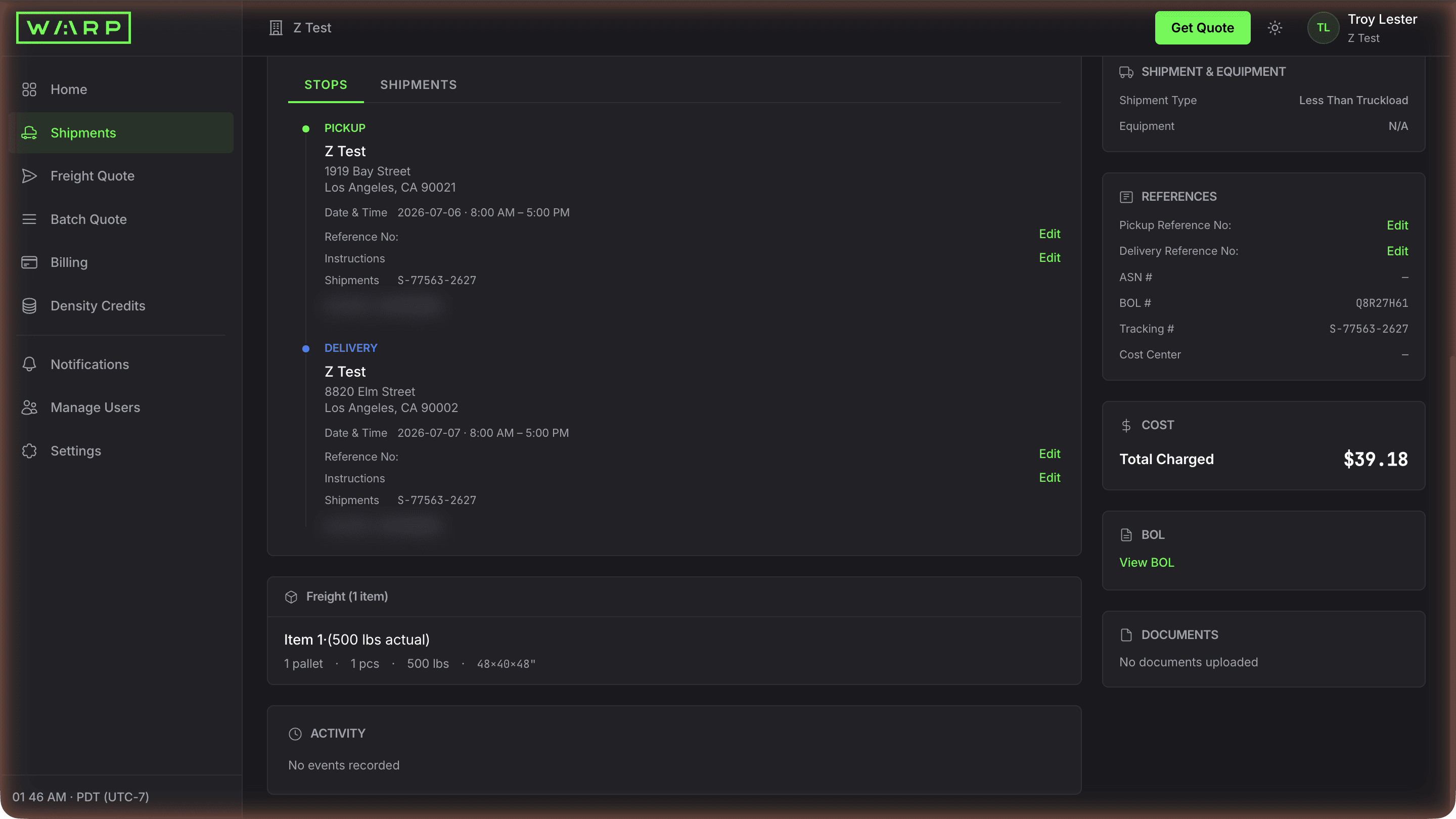
Scroll the shipment detail. The Stops tab shows pickup and delivery addresses with dates, times, and contacts. The freight section lists pallet count, weight, and dimensions. The right rail shows shipment type, all your reference numbers (PO, ASN, BOL, Tracking, Cost Center), total charged, a View BOL link, and a Documents section that updates as POD and other files are uploaded.
References sync into the BOL header and invoice for downstream matching. The View BOL link opens the auto-generated Bill of Lading PDF. Documents and Activity update automatically as the carrier event stream and driver app detect events.
Download the auto-generated Bill of Lading
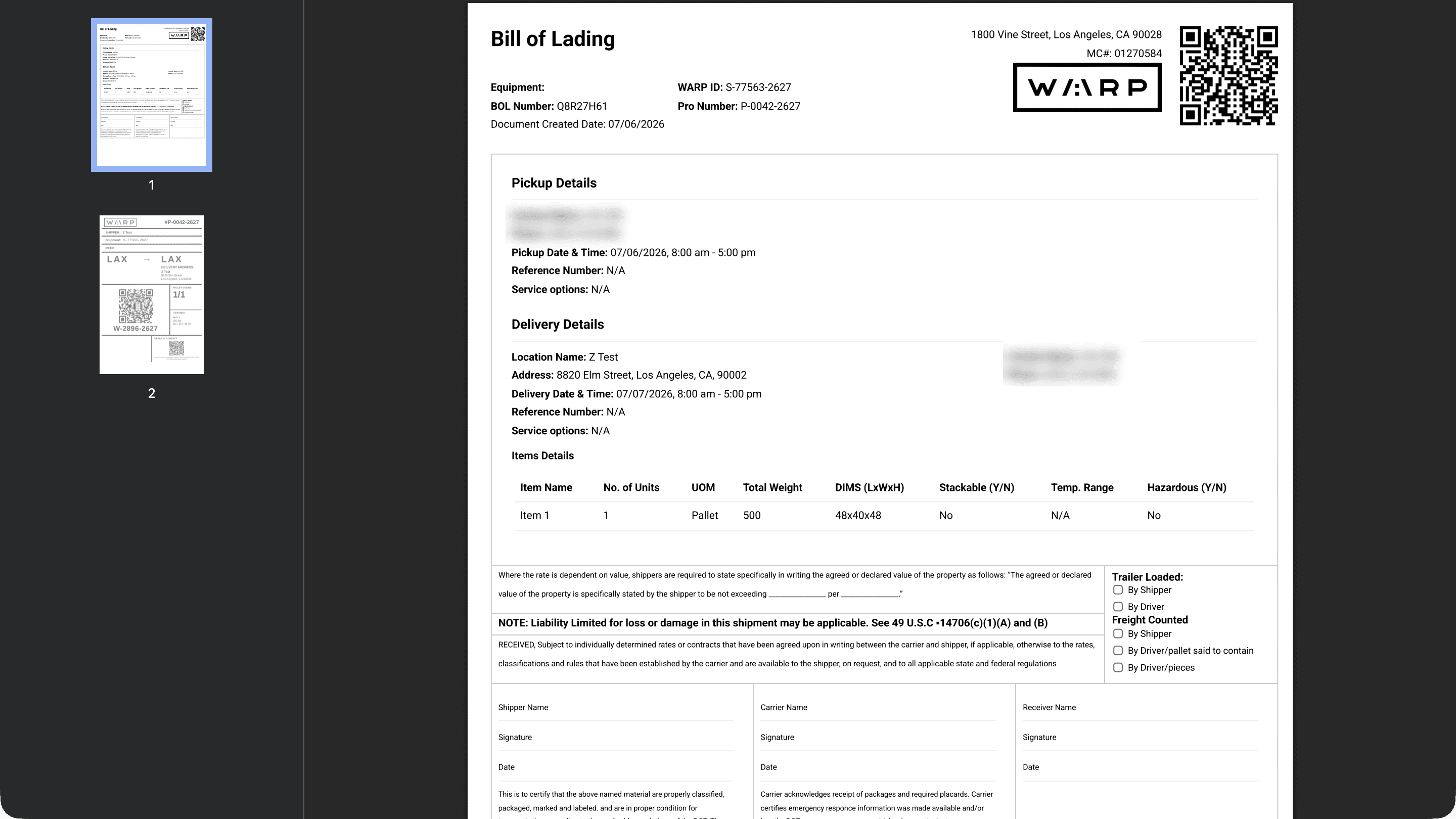
Click View BOL. The PDF is pre-filled with a scannable QR code, your WARP ID, BOL number, pickup and delivery addresses with contacts, an items table with pallet count/weight/dimensions, and the Carmack Amendment liability clause. Signature lines for Shipper, Carrier, and Receiver are ready for pickup.
BOLs are generated server-side from your booking data and stored in encrypted object storage. The QR code encodes the WARP ID for quick dock lookup. Driver signature at pickup is captured via the Warp driver app, and the signed version replaces the blank one in Documents within minutes.
Share a public tracking link with your consignee

Click Tracking Link from any shipment detail. The public page shows a live map, estimated delivery date and window, status, and the stops list with pallet counts. Recipients can click Receive Updates to subscribe to their own text or email notifications. No login required.
Public tracking strips account-specific data. The Receive Updates button creates a notification subscription tied to the single shipment so the consignee gets text or email updates without a Warp account. Estimated Delivery Date updates as GPS and scan events refine the ETA.
Override notifications on a single shipment
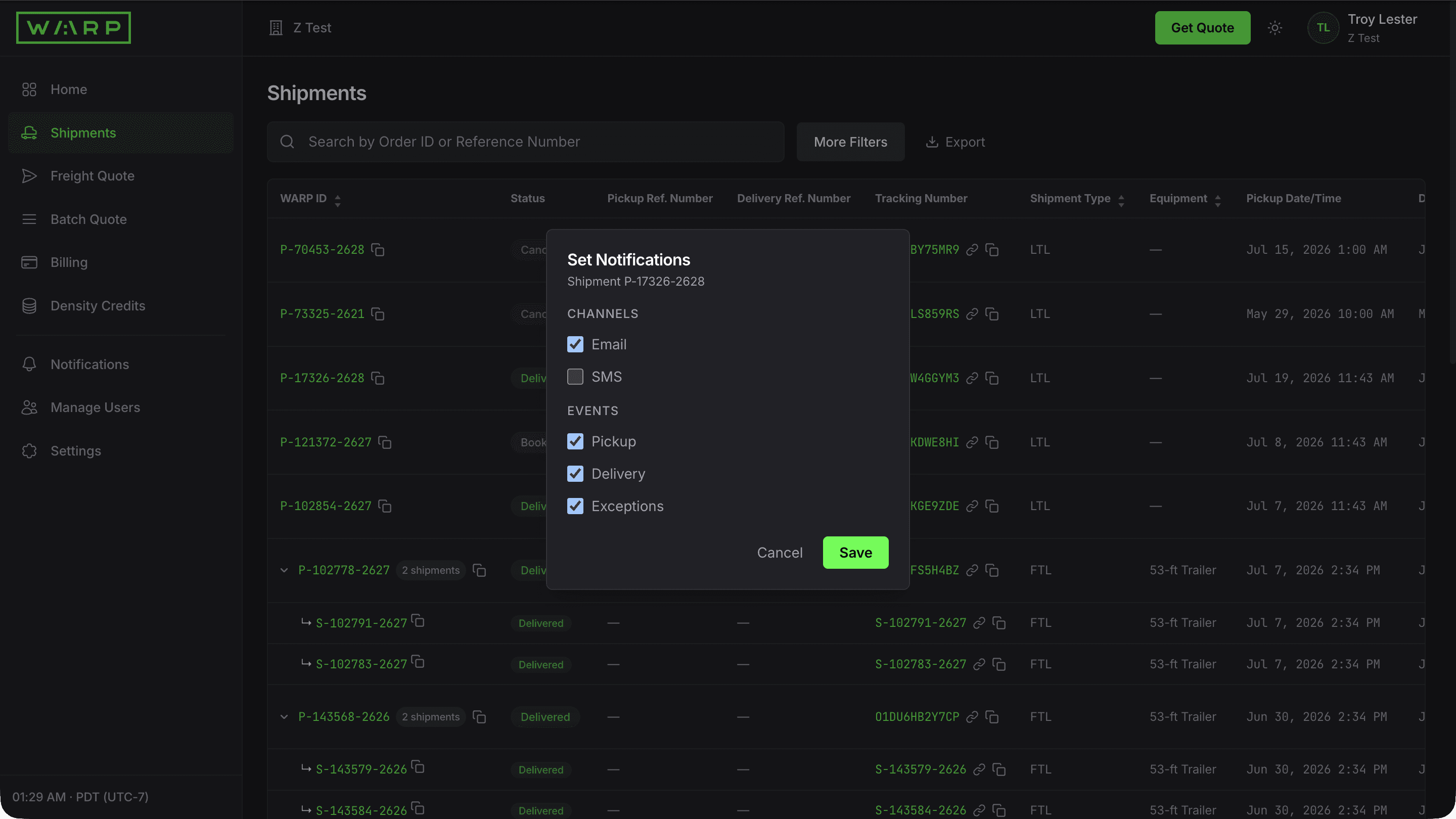
Click the bell icon on any Shipments row. Toggle Email and SMS channels, plus Pickup, Delivery, and Exceptions events, scoped to that one shipment. Use this when a high-value load needs alerts that differ from your global defaults.
Per-shipment overrides are stored as deltas on top of your account-level defaults. The notification service checks per-shipment rules first, then falls back to global preferences. Overrides expire when the shipment hits Completed.
Set global notification preferences per event and channel
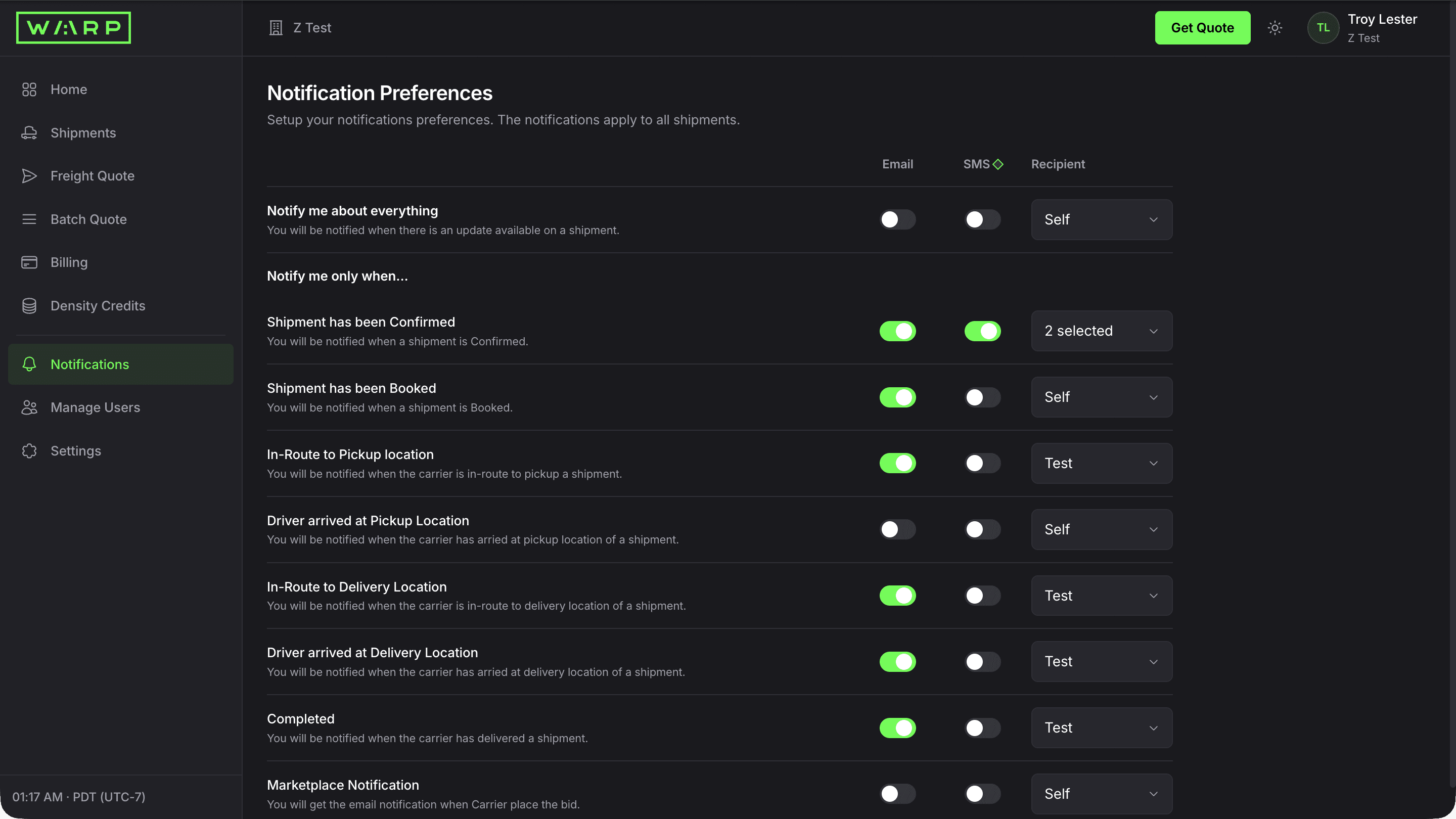
Click Notifications in the sidebar. Toggle Email or SMS independently for each milestone: Confirmed, Booked, In-Route to Pickup, Driver Arrived at Pickup, In-Route to Delivery, Driver Arrived at Delivery, and Completed. Set a different recipient per event using the dropdown.
Notifications fire through Twilio (SMS) or Postmark (email) within seconds of each event. Every notification includes a deep link back to the shipment detail page.
Add notification recipients beyond yourself
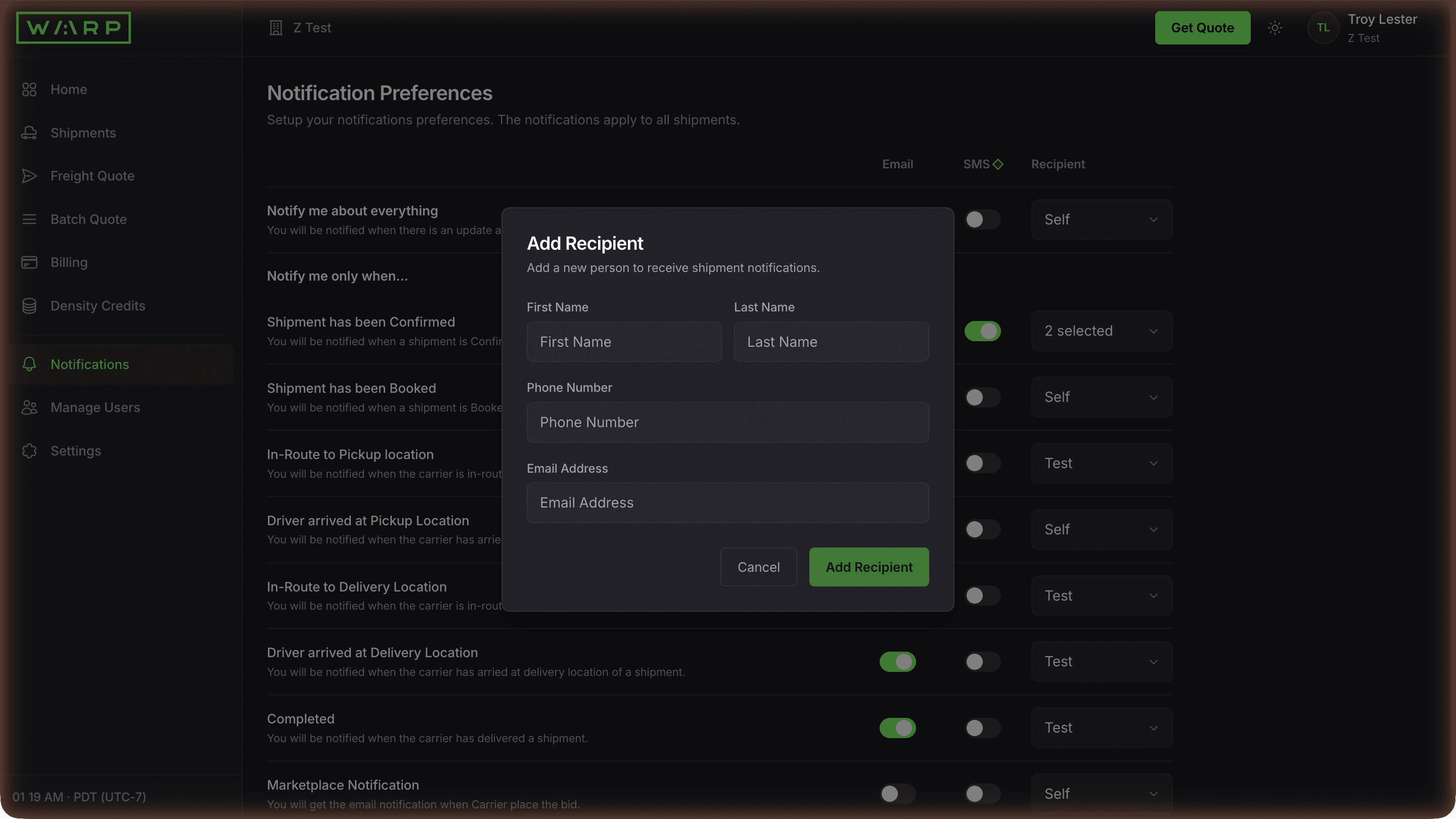
Open the Recipient dropdown on any event and click Add Recipient. Enter the recipient's name, phone number, and email address. They appear in the Recipient dropdown for every event so you can route alerts to warehouse managers, sales reps, or partners without giving them dashboard access.
Recipients are stored alongside your team but cannot log in. They only receive notifications. This lets you alert external partners without granting dashboard access or counting against your seat limit.
Invite teammates with role-based access
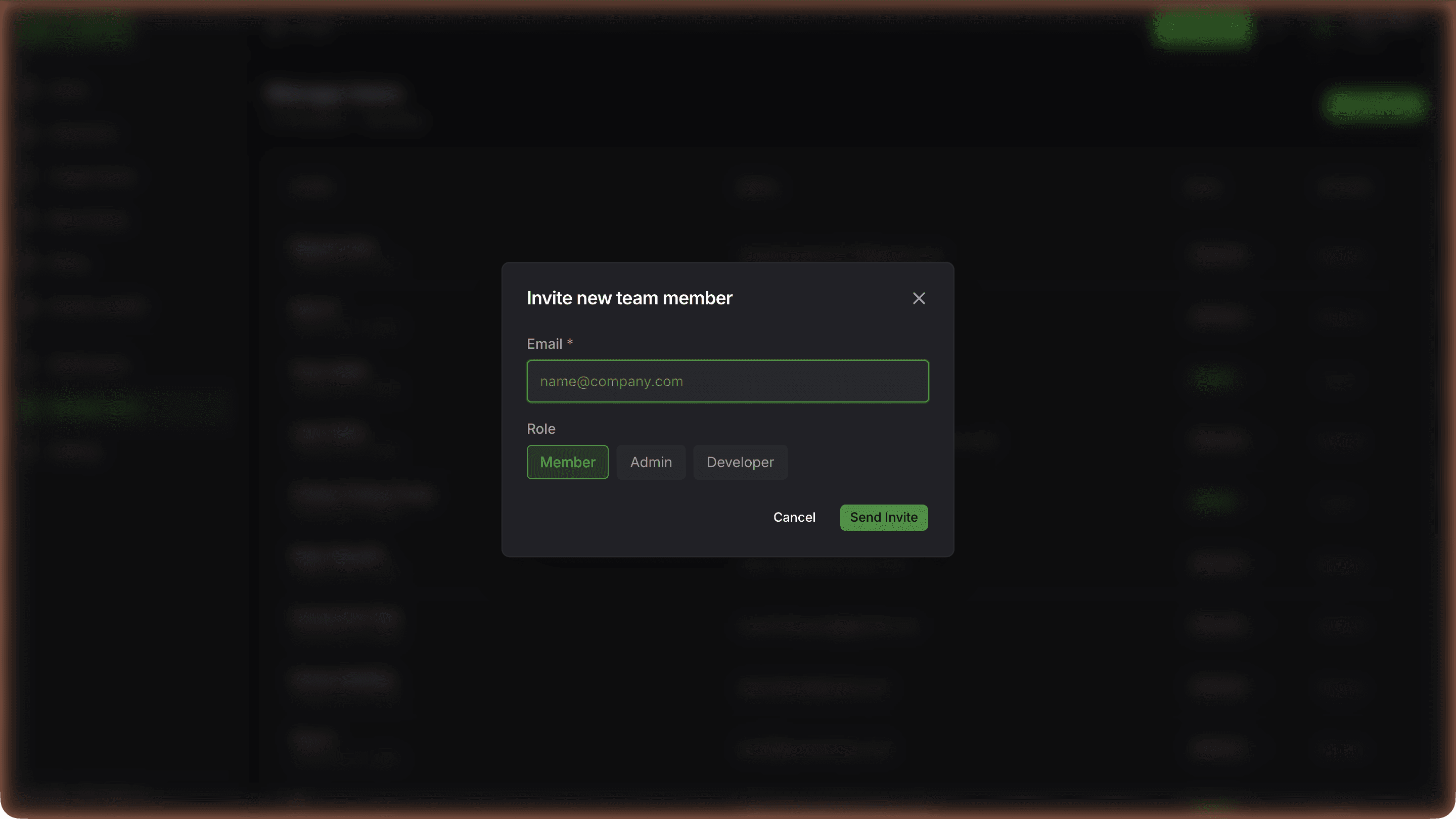
Click Manage Users, then Invite User. Enter their email and pick a role: Member (book and track), Admin (full access including team and billing), or Developer (API keys and webhooks). They receive a magic-link email to set up their login.
Invites use a secure magic-link email, no password sharing required. Roles control access scope. Audit logs track every action by user.
API keys, webhooks, and dark mode
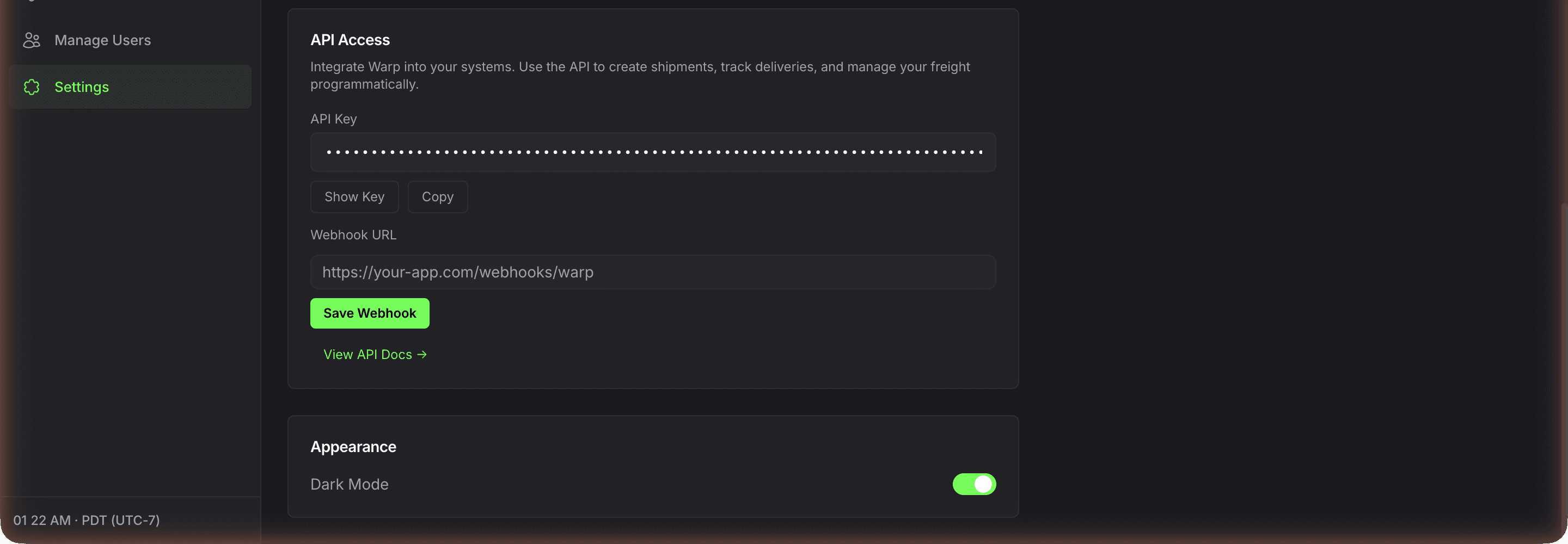
Open Settings. Under API Access, copy your API key or click Show Key to reveal it. A Webhook URL field is available; outbound event push activates on approved accounts. View API Docs links to wearewarp.com/freight-api. Under Appearance, toggle Dark Mode.
API keys give programmatic access to quoting, booking, tracking, invoices, and documents across all four modes. Track shipments by polling GET /api/v1/track and GET /api/v1/events; outbound webhook push is available on approved accounts. Full API reference at wearewarp.com/freight-api.
What the Warp self-service shipper portal is
The Warp self-service shipper portal is a web application at customer.wearewarp.com that unifies quoting, booking, tracking, and document management across a multi-carrier freight network.
This is a shipper portal, not a carrier portal — one interface to ship across LTL, 53-foot dry van FTL, 26-foot box truck, and cargo van through 24,000+ FTL carriers, 14,000+ cargo van and box truck partners, and major LTL networks, without logging into each carrier separately.
Live multi-carrier rates in under 10 seconds, one-click booking, live GPS tracking, auto-generated BOLs and POD, full Freight API for integration. Works on desktop and mobile browsers.
Shipper portal vs carrier portal vs no portal
Carrier portals (FedEx Freight, XPO, Old Dominion, SAIA, Estes, R+L Carriers, ABF Freight, TForce) each show only that carrier's rates and require separate logins, credentials, and workflows.
The Warp shipper portal replaces them with one login and multi-carrier rate comparison — you still ship through the carrier you want, but you compare and book in one place.
For operators who prefer no UI at all, the Warp Freight API and CLI deliver the same capability programmatically (see the Freight Without Portals approach for shippers automating 100% through their own TMS).
Who uses the portal
Operations managers shipping 1 to 50+ loads per week use the portal for daily quoting, booking, and tracking. 3PLs use it to compare modes on behalf of their customers.
Ecommerce brands use it for fulfillment freight. Retail distribution teams use it for store delivery and cross-dock routing. Developers integrate it into their own TMS via the Freight API.
Enterprise accounts moving 500+ pallets a month combine the portal with a dedicated account manager for lane-level optimization.
Why the portal replaces broker workflows
Traditional freight broker workflows require phone calls, email chains, rate callbacks, and manual quote tracking. The Warp portal eliminates that friction.
You see real-time rates from real carriers, compare options across vehicle types, book on your own timeline, track with live GPS, download documents instantly, and push events to your own systems via webhook.
Operations teams save hours per week on quoting alone, and the rate transparency means no more invoice disputes.
Feature surfaces: quote, track, documents
Three narrower pages cover each core surface in depth.
The freight quote portal at /self-serve-portal/quote walks through the ZIP-to-rate flow, 17 accessorials, Top Warp LTL Lanes one-click cards, and the WARP2026 promo for $50 off your first shipment.
The freight tracking portal at /self-serve-portal/track details the 60-second GPS refresh, 4-stage progress, cross-dock scan events, public consignee URLs, and per-event notifications.
The freight document portal at /self-serve-portal/documents explains auto-generated BOL and POD, Falvey insurance certificate, 9-month retention, and BOL Vault bulk export.
Frequently asked questions
What is the Warp freight self-service portal?
The Warp freight self-service portal at customer.wearewarp.com is a web application that lets shippers quote, book, track, and manage LTL, FTL, cargo van, and box truck shipments entirely online.
It replaces the traditional broker phone-and-email workflow with instant multi-carrier rate comparison, one-click booking, live GPS tracking, automated BOL and POD document generation, configurable email/SMS/Slack notifications, role-based team access, and a Freight API for TMS, WMS, and ERP integration.
How do I access the freight portal?
Go to customer.wearewarp.com. New users can get instant rates at customer.wearewarp.com/public/freight-quote without signing up.
To book shipments, track loads, or access your dashboard, create an account (under 1 minute) or sign in with your existing Warp credentials. The portal works on desktop and mobile browsers.
Is the Warp freight portal free?
Yes. Creating an account, getting rates, and using the portal is free. You pay only for shipments you book, at the rate shown at quote time — no subscription, no platform fee, no minimums.
What can I do in the freight portal?
Quote LTL, FTL, cargo van, and box truck shipments with live multi-carrier rates. Book shipments in one click. Track every load with live GPS and a 4-stage progress bar.
Download Bill of Lading, Proof of Delivery, and invoices. Share public tracking links with customers. Configure Email, SMS, or Slack notifications per milestone.
Invite teammates with Member, Admin, or Developer roles. Generate API keys and configure webhooks for integration with your TMS, WMS, or ERP.
How does the portal compare to FedEx Freight, XPO, or traditional LTL carrier portals?
Traditional LTL carrier portals (FedEx Freight, XPO, Old Dominion, SAIA, Estes) only show that single carrier's rates and require freight class lookups, NMFC codes, and post-delivery reclassification adjustments.
The Warp portal returns multi-carrier rates side by side (FedEx Freight, XPO, Old Dominion, and others plus Warp's own fleet and 38,000+ carriers) with flat per-pallet pricing, no fuel surcharges, and no reclassification risk.
Does the portal have an API?
Yes. Go to Settings then API Access in the portal to generate an API key.
The Warp Freight API provides programmatic access to quoting, booking, tracking, invoices, and documents across all vehicle types.
Track shipments by polling GET /api/v1/track and GET /api/v1/events; outbound webhook push is available on approved accounts. Full documentation at wearewarp.com/freight-api.
What user roles does the portal support?
Three roles: Member can book and track shipments, Admin has full access including team management and billing, and Developer gets API key access for integrations.
Invites go out via secure magic-link email through our auth provider — no password sharing required.
Can I track shipments without logging in?
Yes. Every booked shipment gets a public tracking URL that you can copy from the shipment detail page and send to consignees, customers, or warehouse contacts.
The public tracking view shows a map, estimated delivery date, status, and stops — no login required. Recipients can subscribe to their own email or SMS updates with one click.
About the Warp freight network
More about the Warp freight network
Warp is the open source freight network: the tech is free and the network is open. We run Warp LTL, our own carrier, Warp FTL, cargo van, box truck and fulfillment ourselves, with every major LTL carrier, parcel, ocean, air and drayage plugged in beside them. Our driver app rides on every truck and our warehouse app runs every cross-dock, so an open network of 38,000+ carriers behaves like one carrier you control. Warp is licensed by the FMCSA as a property broker and freight forwarder, and runs the network itself: instant rates, live tracking, 70+ cross-dock facilities, 14,000+ cargo vans and box trucks, 80%+ US LTL zip-to-zip coverage and nationwide FTL, box truck and cargo van.
The network is supported by 24,000+ vetted FTL carriers.
Unlike traditional brokers, Warp uses AI to match the right vehicle to every load based on weight, dimensions, urgency, and cost targets. Cross-dock operations reduce transit time by eliminating unnecessary terminal transfers.
Pool distribution and zone-skipping programs help enterprise shippers lower per-unit delivery costs while maintaining tight appointment windows.
Self-serve shippers can quote, compare, and book freight online in under two minutes. Enterprise accounts get dedicated capacity planning, committed rate programs, and a named operations team. Every shipment includes scan-level visibility from pickup through final delivery.
Warp operates across the contiguous United States with regional density in the Southeast, Texas, Midwest, and Northeast corridors, and West Coast and Southwest coverage from Los Angeles, Seattle and Phoenix.
Warp operates 70+ cross-dock facilities across the US, with named markets including Chicago, Atlanta, Houston, New York, Savannah, Orlando, Charlotte, Indianapolis, Columbus, Denver, New Orleans, Milwaukee, Dallas-Fort Worth, Nashville, Phoenix, Tampa Bay, Seattle, Los Angeles. They support faster transfers and fewer touches on recurring lanes.
Freight modes and vehicle types
| Mode | Max payload | Max cube | Best for |
|---|---|---|---|
| Cargo van | 3,500 lbs | 400 cu ft | Time-sensitive, last-mile, light pallets |
| Box truck | 10,000 lbs | 1,500 cu ft | Regional distribution, no dock required |
| LTL | Per-pallet | Shared trailer | Lower per-pallet cost via cross-dock routing |
| Dry van / FTL | 42,000+ lbs | Full 53-ft trailer | High-volume lanes, recurring programs |
Cargo vans handle loads up to 3,500 pounds and 400 cubic feet, ideal for time-sensitive deliveries, last-mile retail replenishment, and lightweight palletized freight.
Box trucks carry up to 10,000 pounds and 1,500 cubic feet, fitting most regional distribution and store delivery needs without requiring a loading dock.
Dry vans and full truckloads move 42,000+ pounds for high-volume lanes and recurring programs. LTL shipments share trailer space on optimized routes through Warp cross-docks, reducing per-pallet cost by consolidating multiple shippers on the same vehicle.
Warp does not default every shipment to a 53-foot trailer. The AI engine evaluates load weight, cube, delivery window, and cost to recommend the right vehicle. Shippers see all available mode options with live pricing in one comparison screen before booking.
Cross-dock operations
Cross-docking at Warp facilities keeps freight moving instead of storing it: inbound freight is sorted and transferred directly to outbound vehicles, typically within hours. When inventory does need to sit, Warp's fulfillment centers in Los Angeles, Dallas, Chicago and New Jersey hold it inside the same network, with same day delivery within 30 miles of each.
This reduces dwell time, lowers damage risk, and compresses delivery windows. Warp cross-docks support pallet-in, pallet-out operations with scan-level tracking at every handoff point.
- Atlanta — Southeast retail flow
- Chicago — Midwest manufacturing and replenishment
- Houston — Texas industrial distribution
- New York — dense Northeast delivery
Facility locations are selected for corridor density: Atlanta handles Southeast retail flow, Chicago serves Midwest manufacturing and replenishment, Houston covers Texas industrial distribution, and New York supports dense Northeast delivery. Each facility operates on appointment-based scheduling to prevent congestion and maintain throughput consistency.
Enterprise freight programs
Enterprise shippers get committed rate programs, dedicated account management, and custom SLA design. Warp builds lane-by-lane rate structures that account for volume commitments, seasonal variation, and mode flexibility. Operations teams monitor shipment execution daily and intervene proactively when exceptions occur.
Self-serve freight quoting
Shippers enter origin and destination, load details, and delivery requirements to see live rates across all available modes. Quotes include estimated transit time, vehicle type, and total cost.
Booking takes one click. After booking, shippers track every shipment with real-time GPS location, milestone updates, and proof of delivery documentation.
Industries and use cases
Retail shippers use Warp for store replenishment programs that deliver to hundreds of locations per week on tight appointment windows. Apparel brands use zone skipping to bypass regional parcel sortation and reduce per-unit delivery cost.
Food and beverage companies rely on time-definite delivery for perishable goods. Manufacturing operations use Warp for inbound vendor consolidation, combining multiple supplier shipments into fewer, fuller loads through cross-dock facilities.
Distribution companies use pool distribution to serve multiple delivery points from a single origin, splitting full truckloads at cross-docks into smaller last-mile vehicles.
Urgent freight recovery covers emergency capacity needs when primary carriers fail or demand spikes unexpectedly. Middle-mile optimization reduces cost and transit time on the longest segment of multi-leg shipments.
Ready to ship?
Get instant rates or talk to our team about a custom freight program.
98.2% on-time delivery · $100K carrier liability · Up to $1M coverage · 2,000+ shippers · No subscription
Performance figures are computed from Warp network data. See our methodology.
By Troy Lester